Insurance Compliance: The Complete Guide to Vendor COI Tracking
Learn how to build an insurance compliance program that protects your business from vendor liability, simplifies audits, and keeps your team out of spreadsheets.
Every business that hires vendors, contractors, or service providers faces the same challenge: making sure those third parties carry active, adequate insurance. It's called insurance compliance, and for most organizations, it's a mess of spreadsheets, emails, and hope.
But insurance compliance isn't just busywork, it's a legal and financial shield. A single uninsured vendor incident can cost your business tens of thousands of dollars. A failed audit can jeopardize contracts, regulatory standing, and professional reputation.
This guide covers everything you need to know about building and maintaining an insurance compliance program that works, from defining requirements to automating verification. Let's get into it.
What Is Insurance Compliance?
Insurance compliance is the process of verifying that every third-party vendor, contractor, or service provider working on your behalf carries insurance coverage that meets your organization's requirements. It is not a one-time checkbox. It is an ongoing discipline of collection, verification, and monitoring.
For property managers, general contractors, facilities directors, and CRE owners, insurance compliance is a critical risk management function. When a vendor damages property, injures someone, or triggers a liability claim, the question is always the same: were they insured? If the answer is no, or you can't prove the answer is yes, your business is exposed.
The financial stakes are significant. The cost of a single uncovered liability claim can easily reach $50,000 to $100,000 or more. Beyond direct costs, lapses in compliance can lead to increased insurance premiums, breached lease agreements, failed regulatory audits, and reputational damage that drives away clients and tenants.
At its core, insurance compliance involves four ongoing activities: collecting certificates of insurance from every vendor, verifying that coverage meets your requirements, tracking expiration dates so nothing lapses, and maintaining auditable records of every verification. For organizations with 50+ vendors, these four activities become a full-time operational burden, unless you have the right systems in place.
Why Manual Insurance Compliance Fails
If your insurance compliance program runs on spreadsheets, shared drives, and calendar reminders, you already know the friction points. What you might not realize is how much risk each one carries.
Spreadsheets Don't Scale
A single spreadsheet might work for 10 vendors. At 50, you're spending 8-10 hours per week on data entry alone. At 200, it's a full-time person. At 500, it's broken. The problem compounds because every new vendor, every expiration, and every requirement change forces another manual update.
No Automated Alerts
Certificates expire every year, sometimes every six months for high-risk trades. If your alert system is a calendar reminder or a colored cell in a spreadsheet, you will miss expirations. Vendors rarely volunteer updated certificates unprompted, and by the time you notice a lapse, they may have been working uninsured for weeks.
Vendors Let Insurance Lapse
Vendors cancel policies for non-payment, switch carriers with coverage gaps, or simply forget to renew. Without a system that proactively flags lapses and automatically notifies vendors, you'll discover gaps during an audit, or worse, after an incident.
Audit Preparation Takes Weeks
When a property owner, corporate office, or regulator requests a compliance audit, manual teams spend days or weeks gathering certificates from email threads, shared drives, filing cabinets, and outdated spreadsheets. A single missing certificate can flag a compliance failure even if the coverage was actually in place.
No Centralized Record Keeping
Without a single source of truth, compliance records fragment across inboxes, desktop folders, and disconnected spreadsheets. Version control becomes impossible, two people may have conflicting information about the same vendor, and nobody knows which is authoritative.
Manual compliance isn't just inefficient. It's a liability. The moment you have more vendors than you can track in your head, you need a system.
Building an Insurance Compliance Program
A structured insurance compliance program replaces reactive firefighting with proactive processes. Here's how to build one, step by step.
Step 1: Define Vendor Insurance Requirements
Start by documenting the minimum insurance coverage every vendor must carry. At baseline, require general liability insurance, typically $1 million per occurrence and $2 million aggregate. For most trades, add workers' compensation at statutory limits. If vendors use vehicles on your property, require auto liability. For higher-risk work, layer in umbrella/excess liability of $2-5 million.
Step 2: Create a Requirement Template Per Vendor Type
Not all vendors need the same insurance. A landscaper's requirements differ from a roofer's. Create reusable templates for each vendor category, low-risk services (janitorial, landscaping), moderate-risk trades (electrical, plumbing, HVAC), and high-risk contractors (roofing, demolition, environmental). Each template specifies coverage types, minimum limits, and required endorsements.
Step 3: Set Up a Collection Process
The traditional approach, emailing vendors to request a COI, then chasing them for weeks, is the bottleneck in most compliance programs. Replace it with a vendor portal where contractors upload their own certificates via a unique link. Set the expectation at onboarding: no compliant COI on file, no start date.
Step 4: Implement a Verification Workflow
Every incoming certificate must be verified against your requirement template. Check coverage types, limits, effective dates, additional insured status, and endorsement detail. AI-assisted extraction can reduce data entry, but a human review is still required before approval.
Step 5: Monitor Expiration Dates
Set up automatic alerts that notify you, and the vendor, at 30, 14, and 7 days before expiration. Monitoring must be continuous, not periodic. A quarterly check means a vendor could go uninsured for up to 89 days before you catch it.
Step 6: Run Quarterly Audits
Even with automated monitoring, conduct a formal compliance audit every quarter. Pull a report of all active vendors, verify each has a compliant COI on file, and document the audit. Share results with property owners, corporate leadership, or relevant stakeholders.
Step 7: Document Everything
Every COI, every verification, every alert, and every audit result should be archived. In a claims scenario or legal discovery, your defense is documentation. "We verified the COI on file" is much stronger than "I'm pretty sure we checked." Centralized, time-stamped audit trails are invaluable.
Insurance Compliance Requirements by Industry
Insurance compliance looks different across industries. Here's a brief overview of what's typically required:
- Property Management. General liability ($1M/$2M), workers' comp (statutory), additional insured endorsement, auto liability for vendors operating vehicles on-site. Requirements often vary by property owner and lease agreement.
- Construction. General liability ($1M-$2M per occurrence), workers' comp, umbrella/excess ($2M-$5M), additional insured and primary/non-contributory endorsements, waiver of subrogation. CCIP/OCIP requirements may apply on large projects.
- Facilities Management. General liability, workers' comp, additional insured, pollution liability for environmental contractors, professional liability for design consultants. Requirements often tied to service-level agreements and corporate risk policies.
- Commercial Real Estate (CRE). General liability ($1M/$2M minimum), workers' comp, umbrella, additional insured, contractual liability coverage. Lease agreements often prescribe specific insurance requirements and audit rights.
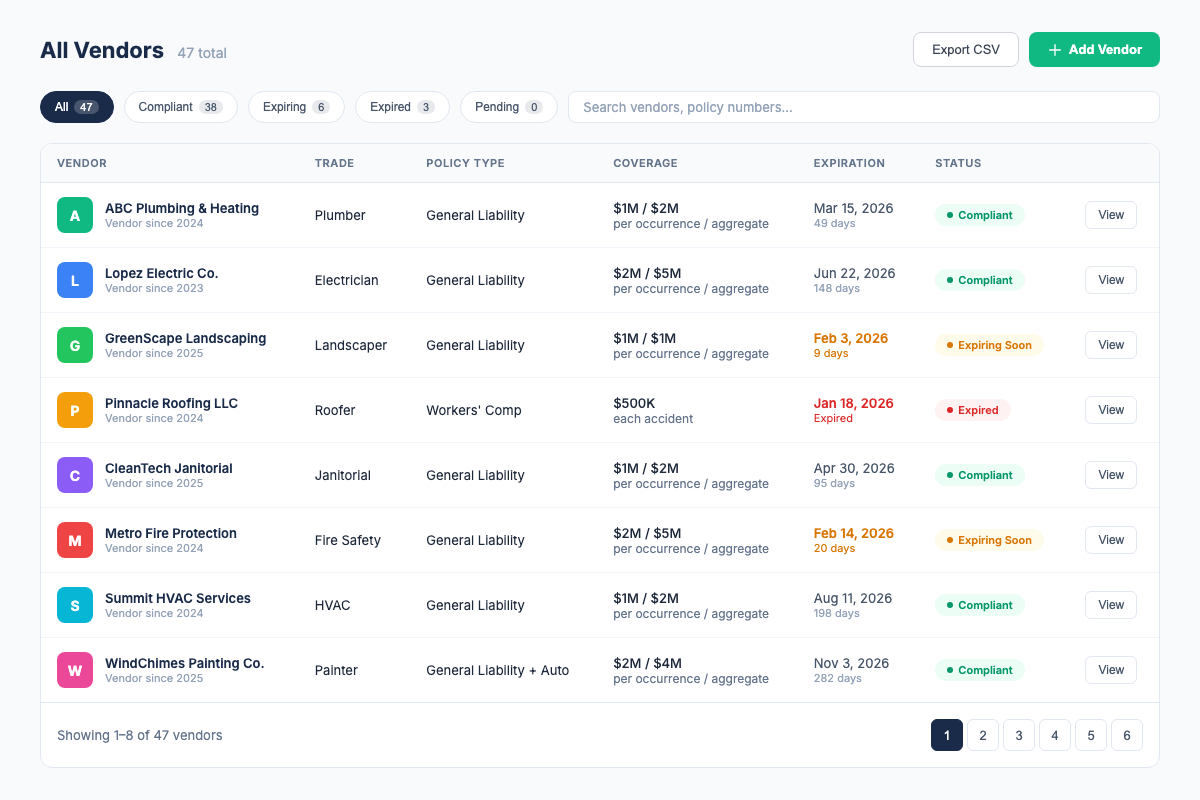
How COI Tracking Software Simplifies Compliance
Insurance compliance software replaces manual processes with automated workflows. Here's what changes when you move off spreadsheets:
AI Extraction Automates Verification
Upload an ACORD 25 PDF. COI File surfaces policy types, coverage limits, effective dates, expiration dates, and relevant wording for review. Confirm the extracted details before approving the vendor record.
Compliance Dashboard Shows Status for All Vendors
One screen shows every vendor color-coded by status: green for fully compliant, yellow for expiring within 30 days, red for expired or non-compliant. Filter by property, vendor type, or compliance issue. What used to take an hour of spreadsheet scrolling takes three seconds.
Automatic Alerts Before Expiration
Email notifications go to you and the vendor at 30, 14, and 7 days before a certificate expires. No calendar reminders, no spreadsheets to check, no missed deadlines.
Vendor Portal Eliminates Email Chasing
Give each vendor a unique upload link. They submit their COI, and it appears in your dashboard automatically, no back-and-forth emails, no attachments to download and rename, no version confusion.
Vendor Roster Export
Filter the vendor roster by property or status and export the working list as CSV when you need to share or continue analysis outside the app.
Full Audit Trail
Every upload, verification, alert, and status change is logged with timestamps. When someone asks whether a vendor was compliant on a specific date, you have the documented answer.
What to Look for in Insurance Compliance Software
Not all compliance tools are built the same way. Here's what to look for when evaluating software:
- Automatic expiration alerts. Non-negotiable. The system must notify you and the vendor at least 30, 14, and 7 days before expiration.
- AI-assisted document extraction. COI File currently supports an ACORD 25 PDF workflow that surfaces policy types, limits, dates, and relevant wording for human review.
- Per-vendor requirement templates. You need the ability to define different insurance requirements for different vendor types or properties, and the system should automatically flag certificates that don't meet those requirements.
- Compliance dashboard. A single screen that shows vendor compliance status at a glance, with filtering by property, vendor type, and compliance status.
- Roster export. Export the current vendor list and statuses as CSV; confirm any formal audit-report requirement separately.
- Vendor self-service portal. Vendors should be able to upload their own certificates through a unique link, removing you from the email chain entirely.
- Transparent pricing. If you need to "contact us for pricing," expect $500+/month. Look for tools that list pricing publicly and offer self-service signup.
- CSV import/export. You likely have an existing vendor list in a spreadsheet. The software should let you import it in one step, not re-enter everything manually.
Insurance Compliance Best Practices
- Define requirements before you need them. Write down exactly what insurance each vendor type must carry, including limits, endorsements, and additional insured language. Do this before the first vendor shows up, not after an incident.
- Require COIs before work starts. This is your single most important rule. No compliant certificate on file, no work. Enforce it consistently with every vendor, no exceptions.
- Use a vendor portal from day one. Train vendors to upload their own certificates. The first time you send a portal link sets the expectation for the entire relationship.
- Audit quarterly, not annually. Insurance can lapse mid-term. A quarterly audit catches gaps within 90 days instead of 365. For high-risk operations, audit monthly.
- Verify the additional insured endorsement. A COI without the additional insured endorsement provides no protection to your organization. Check this field on every certificate.
- Archive everything permanently. Even expired certificates and old audit reports should be retained. In claims litigation or regulatory review, historical documentation may be the difference between proving and presuming compliance.
- Automate before you grow. If you're adding vendors, properties, or projects, get a compliance system in place first. Manual tracking at 50 vendors is painful. At 200, it's impossible. At 500, it's negligence.
Frequently Asked Questions
Related Resources
- What Is a Certificate of Insurance?, the pillar page covering COI fundamentals, ACORD forms, and who needs them
- ACORD 25 Certificate of Insurance, how to read and verify the most common COI form in use today
- COI Tracking: The Complete Guide, the full pillar page on COI tracking software, best practices, and industry-specific solutions
- COI File Features, see everything our compliance platform can do
- COI File Pricing, transparent pricing, 7-day free trial on all plans
Firdaosh Bano
COI Compliance Specialist
Firdaosh Bano is a COI compliance specialist and the founder of COI File. She spent 6 years managing vendor compliance for commercial properties - tracking 2,000+ COIs across 150+ properties in spreadsheets before building the tool she wished she'd had. She writes about certificate of insurance compliance, vendor risk management, and making insurance tracking less painful for small teams.