COI Tracking: The Complete Guide for Property Managers & Contractors
Stop chasing expired certificates. Learn how to track, verify, and manage vendor insurance compliance - the simple way.
Managing certificates of insurance shouldn't take 10 hours a week. Yet for most property managers and contractors, that's exactly what happens - spreadsheets, email chains, and missed expirations that create real liability risk.
COI tracking is the process of collecting, verifying, monitoring, and renewing vendor certificates of insurance so you always know who's compliant and who's not. This guide covers everything you need to know about how COI tracking works, why it matters, and how to do it efficiently.
What is COI Tracking?
A certificate of insurance (COI) is a document that proves a vendor or subcontractor has active insurance coverage. It summarizes the policy types (general liability, workers' comp, auto, umbrella), coverage limits, effective dates, expiration dates, and additional insured endorsements.
COI tracking means keeping a record of every vendor's certificate of insurance and monitoring those certificates for:
- Expiration dates - knowing when coverage is about to lapse
- Coverage limits - verifying the vendor carries the required minimums
- Additional insured status - confirming your organization is listed as additional insured
- Policy types - ensuring the vendor carries the right types of insurance (GL, WC, auto, etc.)
- Endorsements - checking for waivers of subrogation, primary/non-contributory clauses, and other requirements
Without a system, COI tracking means opening PDFs, reading ACORD 25 forms line by line, typing data into a spreadsheet, setting calendar reminders, and chasing vendors by email. It's tedious, error-prone, and easy to let things slip through the cracks.
Why COI Tracking Matters
The consequences of poor COI tracking are not theoretical. They're expensive:
- Uncovered claims. If a vendor's insurance lapses and an incident occurs on your property, the property owner - and potentially you - are liable. Claims can range from thousands to hundreds of thousands of dollars.
- Contract violations. Most property management agreements and construction contracts require proof of insurance. Failure to maintain compliant COIs can put you in breach of contract.
- Insurance premium increases. Claims filed against your policy because a vendor was uninsured can drive up your own premiums.
- Audit failures. Property owners, corporate offices, and regulators may require proof that all vendors are insured. Incomplete records lead to audit failures.
- Time waste. The average property manager spends 8-10 hours per week on COI-related tasks: collecting, verifying, following up, and updating spreadsheets.
In my six years managing vendor compliance for commercial properties in Chicago, I tracked over 2,000 COIs across 150+ properties. Three vendors let their general liability lapse in the same month - and I didn't find out until an incident was already on my desk. One of those gaps cost the property $47,000 in uncovered damages. That's why I built COI File.
Who Needs COI Tracking?
Anyone who requires vendors or subcontractors to carry insurance needs a COI tracking system. The most common users:
Property Managers
Property managers are responsible for ensuring every vendor working on their properties - HVAC contractors, plumbers, electricians, landscapers, janitorial services - carries active insurance. With 20 to 200+ vendors across multiple properties, manual tracking is unsustainable.
Key challenges: tracking across multiple properties, differing requirements per property, quarterly audit requirements, and chasing vendors for updated certificates.
General Contractors
General contractors must verify that every subcontractor on a job site has compliant insurance before work begins. Projects can have 10-50+ subs, each with different coverage requirements.
Key challenges: per-project compliance tracking, trade-specific requirements, project owner reporting, and subs who let insurance lapse mid-project.
Facilities Managers
Facilities managers oversee vendor compliance across building portfolios - offices, retail centers, industrial parks, and mixed-use properties. The volume of vendors multiplied by the number of buildings creates a tracking nightmare without software.
Key challenges: portfolio-wide visibility, per-building vendor lists, quarterly compliance audits, and no centralized system.
Commercial Real Estate
CRE managers track both tenant and vendor COIs. Lease agreements mandate specific coverage limits and additional insured status, and tenant insurance lapses create liability gaps for property owners.
COI Tracking Methods
1. Spreadsheets (Excel, Google Sheets)
The most common starting point. You create a spreadsheet with columns for vendor name, policy types, coverage limits, effective dates, and expiration dates. You update it manually whenever a certificate comes in.
Problems with spreadsheets:
- No automatic alerts - you manually check for upcoming expirations
- Manual data entry - 15-30 minutes per certificate
- Version control - shared spreadsheets get overwritten or duplicated
- No compliance checking - you must manually verify coverage limits and additional insured status
- Easy to miss things - one forgotten row update can mean an expired policy goes unnoticed
If you're currently tracking COIs in a spreadsheet, you're not alone. It is where most people start. When the list grows or several people need to update it, read why spreadsheets fail for COI tracking and compare the workflow with COI software.
2. COI Tracking Software
Dedicated COI tracking software automates the entire process:
- AI-assisted extraction: Upload an ACORD 25 PDF and review surfaced coverage limits, dates, and additional insured details
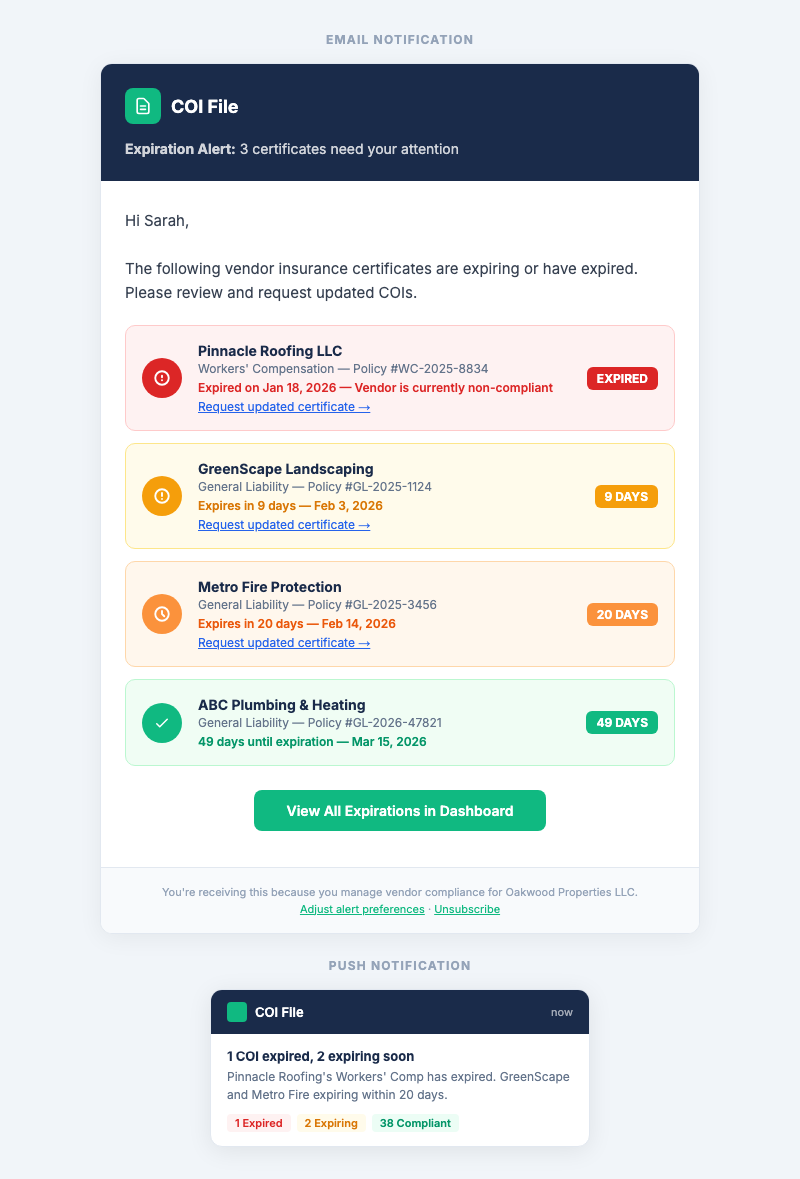
- Expiration alerts: Automatic email notifications at 30, 14, and 7 days before a certificate expires
- Compliance dashboard: See which vendors are compliant (green), expiring soon (yellow), or expired (red)
- Vendor portal: Vendors upload their own certificates, eliminating the need to chase them by email
- CSV roster export: Export vendor and compliance status data for internal follow-up or sharing
The workflow reduces repetitive entry and keeps review status, vendor follow-up, and renewal dates in one place.
How to Choose COI Tracking Software
When evaluating COI tracking tools, look for these features:
- AI-assisted extraction. COI File currently supports an ACORD 25 PDF workflow that surfaces key data fields for human review.
- Automatic expiration alerts. The whole point is not having to check dates manually. Make sure alerts go to both you and the vendor.
- Compliance dashboard. You need at-a-glance visibility into which vendors are compliant and which are not. Color-coded status (green/yellow/red) is ideal.
- Vendor upload link. This lets vendors submit an updated ACORD 25 PDF through a secure magic link.
- Transparent pricing. Beware of "contact us for pricing" - that usually means enterprise pricing starting at $500+/month. You should be able to see pricing and start without a sales call.
- Self-service signup. If you can't sign up and start tracking immediately, the product isn't built for small teams.
- CSV import/export. Bring an existing vendor list in and export current roster data when needed.
COI Tracking Best Practices
- Set clear insurance requirements. Define the minimum coverage limits, additional insured requirements, and endorsements you need from each vendor type before you start tracking.
- Collect certificates before work begins. Never let a vendor start work without a compliant COI on file. This is your first line of defense.
- Set alerts at 30, 14, and 7 days. Give yourself enough lead time to request an updated certificate before the current one expires.
- Verify every certificate. Don't just file it - check the coverage limits, additional insured status, effective dates, and cancellation clause. Many certificates contain errors that would make them non-compliant.
- Require vendors to name you as additional insured. This is critical. If a vendor's policy doesn't list you as additional insured, you may not be covered under their policy.
- Track per-project and per-property. If you manage multiple properties or projects, organize your COIs accordingly. A vendor may be compliant on one project but not another.
- Archive expired certificates. Keep old certificates on file. You may need them for insurance claims or audits even after they expire.
- Use COI tracking software instead of spreadsheets. The moment you're managing more than 10 vendors, the manual approach takes more time than it saves.
Common COI Tracking Mistakes
- Only checking at renewal time. Vendor insurance can lapse mid-term (cancellation, non-payment). Check compliance continuously, not just at annual renewal.
- Not verifying additional insured status. A COI that doesn't list you as additional insured provides no protection under the vendor's policy.
- Ignoring the cancellation clause. Most ACORD 25 forms state "should be canceled, a notice will be sent." Should is not will. Follow up proactively.
- Accepting expired certificates. It happens more than you'd think. Always check effective and expiration dates before filing.
- Not tracking by trade. Different trades have different insurance requirements. An electrician needs different limits than a landscaper. Use requirement templates.
- Relying on vendors to notify you. Vendors rarely proactively send updated certificates. Set up alerts and follow up automatically.
How COI File Simplifies COI Tracking
COI File is built for property managers and contractors who are tired of spreadsheets. Here's how it works:
- Upload an ACORD 25 PDF. AI-assisted extraction surfaces key data for your review before approval.
- See compliance at a glance. Your dashboard shows every vendor's status: green (compliant), yellow (expiring soon), red (expired or non-compliant).
- Get alerts before expiration. Automatic email alerts at 30, 14, and 7 days. Both you and your vendor get notified.
- Export the roster. Download current vendor and status data as CSV for follow-up or sharing.
COI File starts with a 7-day trial after secure checkout and payment-method setup. Start a Base trial.
Frequently Asked Questions
Sources & Further Reading
- IRMI, Contractual Risk Transfer, Comprehensive resources on how certificates of insurance fit into contractual risk transfer strategy. irmi.com
- ACORD Forms & Automation, The official source for ACORD 25 forms, XML standards, and insurance data automation. acord.org
- NAIC Certificate of Insurance Model Act, Model legislation adopted by many states governing the use and regulation of certificates of insurance. content.naic.org
- OSHA, Workplace Safety, Regulations that impact workers' compensation and liability insurance requirements for contractors and vendors. osha.gov
- American Institute of Architects (AIA), Contract documents that frequently reference COI requirements for construction and design professionals. aiacontracts.org
Related Resources
- COI Tracking for Property Managers, multi-property compliance strategies and best practices
- COI Tracking for General Contractors, per-project subcontractor compliance management
- COI Tracking for Facilities Managers, per-building vendor tracking and quarterly audits
- COI Tracking for Commercial Real Estate, tenant + vendor COI management in one place
- COI Tracking for Real Estate Professionals, AI-powered certificate management for CRE
- How to Collect Certificates of Insurance, automate COI collection from vendors
- Vendor COI Collection Workflow, a practical onboarding and renewal process
- Subcontractor Insurance Requirements Checklist, what to review before work begins
- Top COI Tracking Mistakes, common gaps and how to repair them
- COI Tracking Software Features, what to look for before you buy
- COI Tracking Software for Property Management, compare tools for PM teams
- Best COI Tracking Software, compare top COI tracking tools, features, and pricing
- Best COI Software for Contractors, compare tools for GCs and subs
- Best COI Software for Property Managers, compare tools for PM portfolios
- COI Tracking Spreadsheet Guide, when spreadsheets work and when to switch to software
- COI Compliance Rate Guide, how to measure and improve vendor insurance compliance
- COI Tracking for Electricians, insurance compliance for electrical contractors
- COI Tracking for Plumbers, insurance compliance for plumbing contractors
- COI Tracking for HVAC Contractors, insurance compliance for HVAC trades
- COI Tracking for Roofers, insurance compliance for roofing contractors
- COI Tracking for General Contractors, managing subcontractor insurance compliance
- Certificate of Insurance Guide, what a COI is, how to read one, and how to verify compliance
- COI File Features, see everything our platform can do
- COI File Pricing, 7-day free trial on all plans, transparent pricing for everyone else
Firdaosh Bano
COI Compliance Specialist
Firdaosh Bano is a COI compliance specialist and the founder of COI File. She spent 6 years managing vendor compliance for commercial properties - tracking 2,000+ COIs across 150+ properties in spreadsheets before building the tool she wished she'd had. She writes about certificate of insurance compliance, vendor risk management, and making insurance tracking less painful for small teams.