COI Tracking for Facilities Managers: Protect Every Building in Your Portfolio
Stop discovering insurance lapses only during quarterly audits. Learn how facilities managers automate vendor compliance across every building.
Picture this: you manage facilities across 20 buildings. Each building has 5-15 vendors, HVAC contractors, electricians, plumbers, janitorial crews, landscapers, elevator technicians, fire suppression specialists, and security providers. That's 100-300 vendors, each carrying insurance policies that expire every year. And every quarter, you need to prove all of them are compliant.
If you're tracking COIs in spreadsheets and chasing vendors by email, you already know the pain. A typical facilities manager spends 12-15 hours per week on certificate management, downloading PDFs, squinting at ACORD 25 forms, copying data into cells, and sending follow-up emails. The sheer volume across a multi-building portfolio makes manual tracking unsustainable.
COI tracking software built for facilities managers automates the entire process. This guide covers everything facilities managers need to know about tracking certificates of insurance, from the unique challenges you face to the features that actually matter.
Why Facilities Managers Need COI Tracking Software
Facilities managers face a compliance challenge that's fundamentally different from what property managers deal with. Here's why:
- Scale across buildings. A facilities organization might manage 5, 20, or 100+ buildings, corporate offices, warehouses, retail locations, data centers, manufacturing plants, and distribution centers. Each building has its own roster of vendors. That's not dozens of COIs to track, it's hundreds or thousands.
- Mixed vendor profiles. No two buildings have identical vendor rosters. Building A uses Vendor X for janitorial and Vendor Y for HVAC. Building B uses Vendor Z for both. Tracking which vendor serves which building, and whether their insurance is active at each location, creates complexity that generic systems can't handle.
- Quarterly audit pressure. Many facilities organizations operate under quarterly compliance audits, either from corporate risk management, property owners, or regulatory bodies. Every three months, you must produce evidence that every vendor across every building carries compliant, current insurance. Without automated reporting, preparing for these audits is a week-long scramble.
- Operational risk. When a vendor works uninsured and causes damage or injury, the facility owner bears the liability. I've seen a single uncovered claim at a warehouse facility cost the organization $65,000 in damages and legal fees, plus a contract termination.
The Pain Points of Manual COI Tracking for Facilities Managers
1. Spreadsheet Complexity Across Multiple Buildings
A single spreadsheet tracking 200 vendors across 20 buildings quickly becomes unmanageable. You're tracking vendor names, building assignments, policy numbers, coverage types, limits, effective dates, expiration dates, and additional insured status, multiplied by the number of certificates each vendor carries (general liability, workers' comp, auto, umbrella). Different team members update different versions, and soon nobody knows which file is the source of truth.
2. The Email Chase, At Scale
Vendors don't proactively send updated certificates. When you're managing 200+ vendors, the email chase becomes a full-time job. You send reminders, follow up, escalate, and repeat. Meanwhile, certificates expire silently, and you only discover the lapse during the next audit, or worse, after an incident.
3. No Centralized System
Certificates arrive by email, get saved to shared drives, and their details get typed into spreadsheets. There's no single dashboard showing you which vendors are compliant, which are expiring soon, and which have gaps. Answering "are all our vendors compliant at Building C?" requires manually cross-referencing emails, files, and spreadsheets.
4. Quarterly Audit Anxiety
Quarterly audits mean the clock is always ticking. Every three months, you need to compile compliance evidence for every building's vendors. Without automated reports, this means days of spreadsheet hunting, email searching, and PDF downloading. And when an auditor flags a single expired certificate, it triggers a cascade of follow-ups and can result in a formal compliance finding.
5. Differing Requirements Per Building
A manufacturing plant may require pollution liability from environmental contractors. A corporate office may require $1M/$2M general liability with additional insured. A data center may require professional liability from IT vendors and stricter coverage limits. Tracking these requirements per building in a spreadsheet is error-prone, especially as vendors are added, removed, or reassigned across buildings.
How COI Tracking Software Solves These Problems
A COI tracking platform designed for facilities management replaces your patchwork of spreadsheets and emails with three core capabilities:
1. AI-Powered Upload
Upload an ACORD 25 PDF through the vendor workflow. COI File surfaces policy types, coverage limits, dates, and relevant wording for review, so your team can confirm the details before updating the vendor record.
2. Per-Building Compliance Dashboard
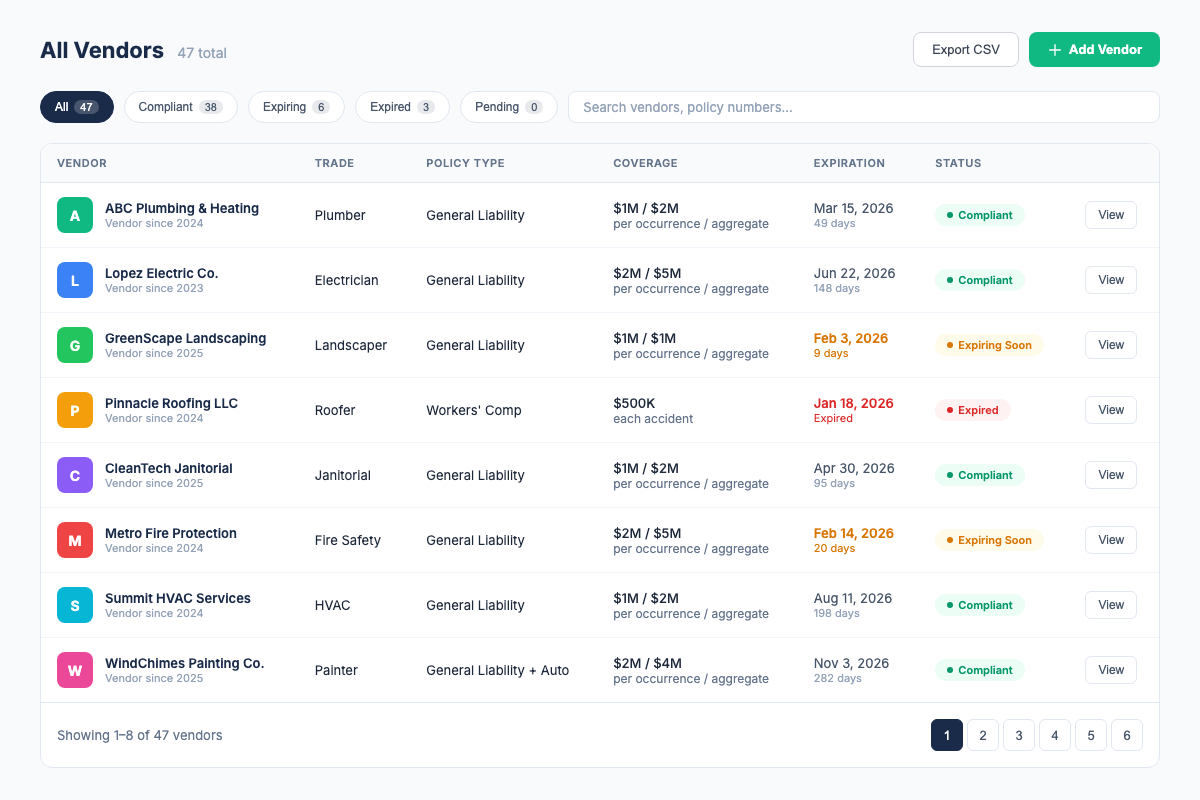
Your dashboard shows every vendor organized by property, with clear compliance status: green for compliant, yellow for expiring within 30 days, red for expired or non-compliant. Filter by property, vendor type, or compliance status, then export the current roster as CSV when needed.
3. Automatic Expiration Alerts
Email notifications go out to you, and optionally to the vendor, at 30, 14, and 7 days before expiration. You stop chasing, vendors get automated reminders, and nothing lapses without warning. For facilities managers juggling 100+ vendors, this alone eliminates 5+ hours of weekly follow-up work.
COI File reduces repetitive certificate entry by surfacing details from ACORD 25 PDFs for review, while keeping vendor status and renewal dates in one roster.
What Facilities Managers Should Look For in COI Tracking Software
Not all COI tracking tools are built for facilities management. Here's your checklist:
- Per-building organization. You must be able to organize vendors by building and see compliance status per location. This is non-negotiable when you manage 5-100+ buildings with different vendor rosters at each.
- Building-specific requirement templates. Different buildings have different insurance requirements. A warehouse with heavy equipment needs different coverage than a corporate office. The software should let you define custom requirements per building and automatically flag non-compliant certificates.
- AI-assisted extraction. COI File currently supports an ACORD 25 PDF workflow that surfaces key fields for human review.
- Vendor upload link. Give each vendor a unique magic link so they can submit an updated PDF without creating an account.
- Roster export. COI File supports CSV export for current vendor status; verify any formal PDF-report requirement separately.
- Automatic alerts. COI File sends email alerts at 30, 14, and 7 days before expiration, with broker CC/escalation support where configured.
- Transparent pricing. If you have to "contact us for pricing," expect $500+/month. Look for pricing that's listed on the website and self-service signup. Facilities budgets appreciate predictability.
- CSV import. Bring an existing vendor spreadsheet into the workflow on supported plans instead of manually re-entering every record.
COI Tracking Best Practices for Facilities Managers
- Create a master vendor insurance requirements document. Define standard coverage requirements per vendor type and per building classification. Include minimum coverage limits, additional insured requirements, and any building-specific endorsements (waiver of subrogation, primary and non-contributory, etc.).
- Enforce a "no COI, no access" policy. Never let a vendor start work at any building without a compliant COI in the system. If the dashboard doesn't show green, the vendor doesn't get building access. Period.
- Use a vendor portal from day one. Onboard every vendor with their unique upload link. Establish the expectation: the vendor is responsible for maintaining current certificates in the portal. You verify compliance, not chase documents.
- Run compliance audits monthly, not just quarterly. Quarterly audits are the minimum. Supplement them with monthly spot checks, especially for high-risk vendor types like electrical, roofing, and heavy equipment. A monthly 10-minute dashboard review prevents surprises at quarterly audit time.
- Track the additional insured endorsement religiously. A COI without the proper additional insured endorsement provides zero protection. Make this a required, validated field in your tracking system.
- Archive everything, even expired certificates. Retain all certificates, past and present. You may need historical insurance records for claims investigation, legal discovery, or regulatory inquiries years later.
- Standardize requirements across similar building types. If you manage 20 corporate offices, create one requirement template and apply it to all 20. Only create custom templates for buildings with unique needs (manufacturing, data centers, etc.). This dramatically reduces the administrative overhead of maintaining per-building rules.
- Integrate vendor compliance into the procurement process. Require a compliant COI as part of vendor onboarding and contract renewal. Don't let procurement issue a purchase order without confirming COI compliance in the system.
How COI File Helps Facilities Managers
COI File was built by a facilities management compliance specialist who spent 6 years tracking 2,000+ COIs across 150+ buildings, in spreadsheets. Here's how it works for facilities managers:
- Review an ACORD 25 PDF. Submit a vendor PDF and review AI-assisted extracted policy types, coverage limits, dates, and additional insured details.
- Organize by building. Tag each vendor to a specific building. See compliance status per building on your portfolio dashboard, every building, every vendor, at a glance.
- Set per-building requirements. Define the coverage limits, additional insured needs, and endorsements required for each building or building type. COI File automatically flags any certificate that doesn't match.
- Give vendors a magic link. Send each vendor a unique upload link so they can submit an updated PDF without an account.
- Get alerted before surprises. Automatic email alerts at 30, 14, and 7 days before a vendor certificate expires.
- Export the roster. Download current vendor and status data as CSV for internal follow-up or sharing.
- Import your existing vendor list. Have 200+ vendors in a spreadsheet? CSV import brings them into COI File in minutes, mapped to your existing building structure.
COI File starts with a 7-day trial after secure checkout and payment-method setup. Base starts at $39/month for up to 10 vendors. Start a Base trial.
Frequently Asked Questions
Industry Sources
- International Facility Management Association (IFMA), Industry standards, certifications, and best practices for facilities management professionals. ifma.org
- Building Owners and Managers Association (BOMA), Resources on building operations, vendor management, and risk compliance. boma.org
- National Fire Protection Association (NFPA), Fire safety codes and standards that intersect with vendor insurance and compliance requirements. nfpa.org
Related Resources
- COI Tracking: The Complete Guide, the full pillar page covering all aspects of COI tracking
- COI Tracking for Property Managers, how PMs manage vendor compliance across commercial and residential properties
- COI Tracking for General Contractors, how GCs manage subcontractor compliance on job sites
- Best COI Tracking Software, compare features, pricing, and which tool fits your needs
- COI File Features, see everything our platform does
- COI File Pricing, transparent pricing, 7-day free trial on all plans
Firdaosh Bano
COI Compliance Specialist
Firdaosh Bano is a COI compliance specialist and the founder of COI File. She spent 6 years managing vendor compliance for commercial properties - tracking 2,000+ COIs across 150+ properties in spreadsheets before building the tool she wished she'd had. She writes about certificate of insurance compliance, vendor risk management, and making insurance tracking less painful for small teams.