How COI File Works
Three steps from ACORD 25 PDF upload to a reviewable vendor compliance status.
Most COI tracking tools require weeks of setup, training calls, and migrations. COI File takes a different approach: upload a certificate and see the result immediately. Our AI does the heavy lifting so you don't have to become a COI expert.
Here's exactly how it works, step by step. Whether you're tracking 5 vendors or 500, the process is the same.
Upload a Certificate of Insurance
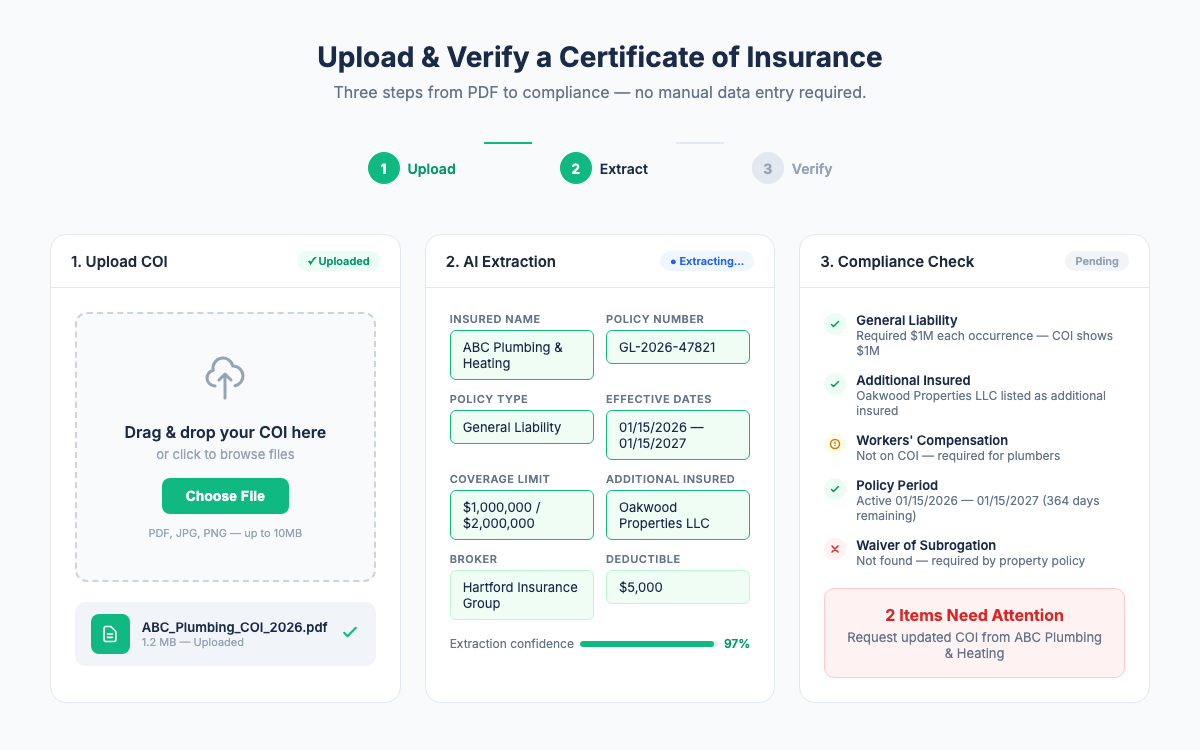
Upload an ACORD 25 PDF. AI-assisted extraction surfaces policy types, coverage limits, effective dates, expiration dates, and additional insured status for your review.
Or let your vendors upload their own certificates via the Vendor Upload Portal. No more chasing COIs by email.

See Compliance Status at a Glance
Your dashboard shows every vendor's compliance status instantly. Green = compliant. Yellow = expiring soon. Red = expired or non-compliant. No more digging through spreadsheets.
COI File automatically checks each COI against your requirement templates - coverage limits, additional insured, waiver of subrogation, and more.

Get Alerts Before Insurance Expires
COI File sends automatic email alerts at 30, 14, and 7 days before a certificate expires. Both you and your vendor get notified. No more surprise lapses.
Need to follow up? Review the vendor's deficiencies and use the available email workflow to request a corrected certificate.

From spreadsheet to dashboard in under 5 minutes
5 min
Start with Google sign-in and secure billing setup.
AI-assisted extraction with a review step.
3
Renewal reminders at 30, 14, and 7 days.
Common workflows
Onboarding a new vendor
Send the vendor your secure upload link. They upload an ACORD 25 PDF, and COI File surfaces extracted fields for your review against the property requirements before you approve it.
Preparing for an audit
Open the vendor roster, filter for the statuses that need attention, and export the vendor data as CSV when you need a working list.
Managing renewals across a portfolio
Your dashboard shows upcoming expirations sorted by urgency. Automatic alerts at 30, 14, and 7 days go to both you and the vendor. When the vendor uploads the renewed certificate, the status updates automatically. No calendar reminders, no follow-up emails.
Stop Tracking COIs in Spreadsheets
Upload a certificate, see compliance status at a glance, and never let coverage lapse again.
7-day trial starts after secure checkout and payment method setup. Cancel before renewal.