Simple COI tracking. Powerful compliance.
The focused workflow for collecting ACORD 25 PDFs, reviewing compliance, and keeping renewals moving.
Tracking certificates of insurance manually, in spreadsheets, email folders, or filing cabinets, is the #1 source of compliance risk for property managers and contractors. Missed expirations lead to coverage gaps. Coverage gaps lead to liability. And when the auditor asks for proof, you're scrambling.
COI File replaces that core workflow. Upload an ACORD 25 PDF, review extracted details and deficiencies, and use the vendor roster to see who is compliant or needs follow-up.
Every feature below was built from conversations with property managers, general contractors, and facilities teams who were tired of spreadsheets. Plans start with a 7-day trial after secure checkout and payment-method setup.
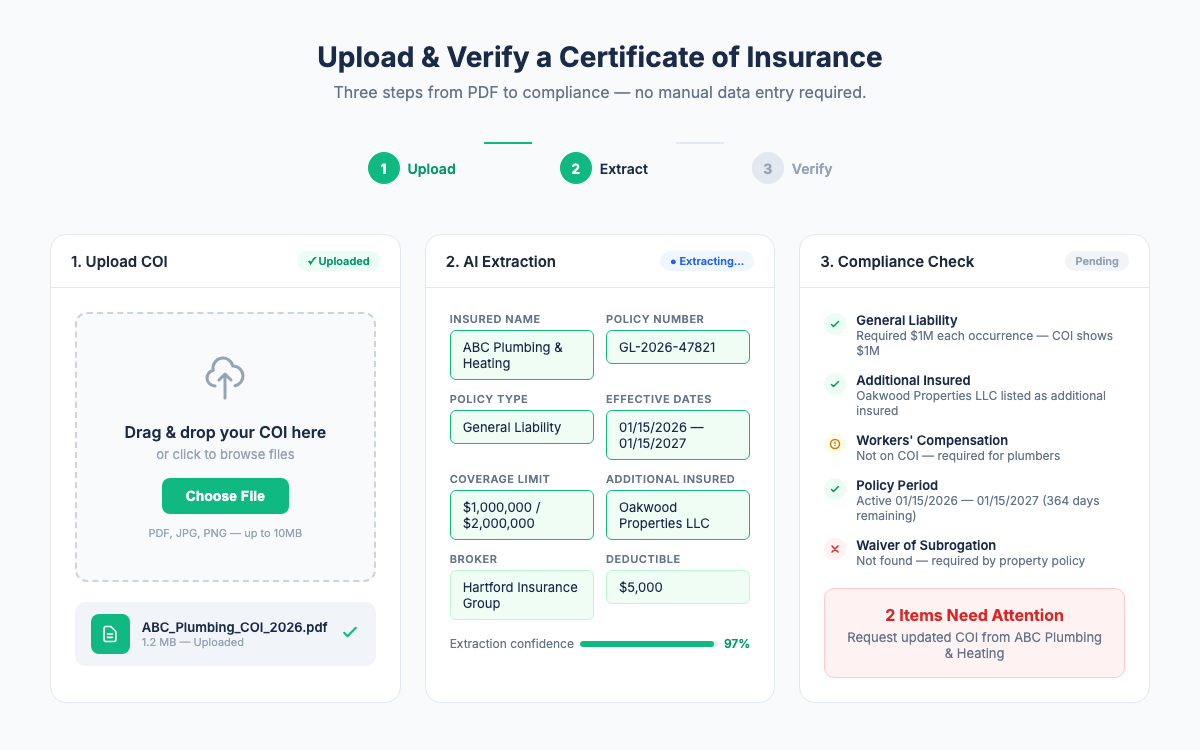
Upload & Extract
Upload an ACORD 25 PDF and review the extracted policy details before approving it.
AI-Assisted Extraction
Upload an ACORD 25 PDF and review extracted policy types, coverage limits, effective dates, expiration dates, and additional insured status.
Drag & Drop Upload
Upload ACORD 25 PDFs for a consistent, reviewable compliance workflow.
Vendor Upload Portal
Give vendors a unique link to upload their own certificates. No more chasing COIs by email.
Track & Comply
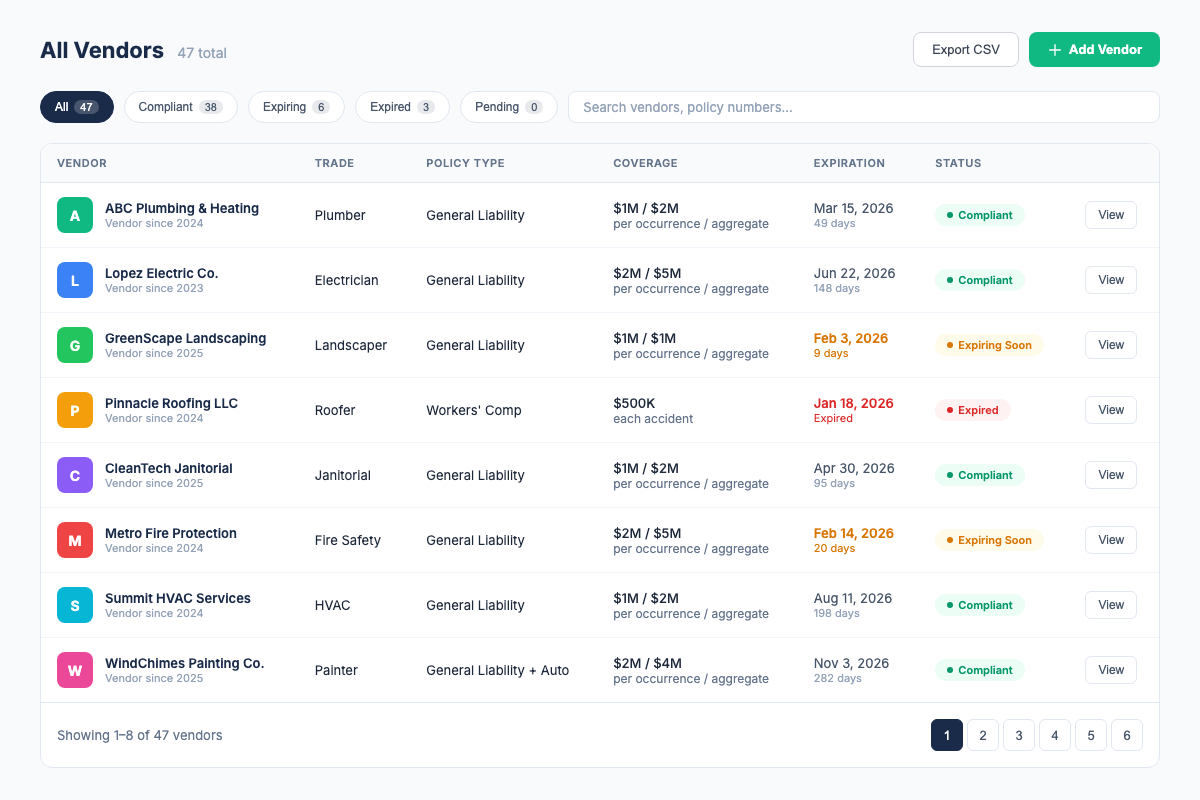
Never miss an expiration or a coverage gap again, your dashboard flags every issue before it becomes a problem.
Compliance Dashboard
See every vendor's compliance status at a glance. Green, yellow, red - no guessing.
Expiration Alerts
Automatic email alerts at 30, 14, and 7 days before a certificate expires. Never be surprised by a lapsed policy.
Requirement Templates
Define insurance requirements per vendor type. COI File checks each COI against your requirements automatically.
Broker Escalation
Include the insurance broker on renewal notices when a vendor needs follow-up.
CSV Import/Export
Import your existing vendor list and export your vendor roster as CSV.
Vendor Review Workflow
Review extracted policy details, deficiencies, and approval status before you accept a certificate.
Frequently asked questions
Which COI formats does the AI support?
The current workflow accepts ACORD 25 PDF files. Review the extracted fields and compliance checks before approving a certificate.
Can I customize insurance requirements per vendor type?
Yes. Create requirement templates for any vendor category, roofing contractors, electricians, HVAC, landscapers, etc. Each template defines minimum coverage limits, additional insured requirements, and endorsements. COI File checks every uploaded COI against the matching template automatically.
Does COI File integrate with property management software?
COI File works standalone. Import your existing vendor list from CSV and export your vendor roster as CSV when you need to share or move data.
How does the vendor upload portal work?
Each vendor gets a unique, secure upload link. They drag and drop their COI, no account needed, no login. Their certificate is automatically processed and checked against your requirements. You get notified when a new COI arrives. No more chasing vendors by email.
Is my data secure?
All data is encrypted at rest and in transit using 256-bit AES encryption. COI File is hosted on Cloudflare's secure infrastructure. We never sell or share your data. Read our security page for details.
Stop Tracking COIs in Spreadsheets
Upload a certificate, see compliance status at a glance, and never let coverage lapse again.
7-day trial starts after secure checkout and payment method setup. Cancel before renewal.