Certificate of Insurance (COI): The Complete Guide for 2026
Learn what a certificate of insurance is, how to read one, who needs it, and how to track COIs efficiently, whether you manage 5 vendors or 500.
A certificate of insurance is the single most important document in vendor risk management. Yet most people who handle COIs on a daily basis, property managers, contractors, office administrators, were never formally taught what a COI is, how to read one, or what makes one compliant versus non-compliant.
This guide changes that. Whether you're seeing your first ACORD 25 form or you've been filing certificates for years, you'll walk away knowing exactly what a COI is, how to verify one, and how to manage them without losing your mind.
With 12,100 people searching for "certificate of insurance" every month, it's clear that COIs are a universal pain point. This guide covers everything from the basics to advanced compliance strategies.
What Is a Certificate of Insurance (COI)?
A certificate of insurance (COI) is a standardized document issued by an insurance agent or broker that summarizes the key details of one or more insurance policies. Think of it as a receipt or snapshot, it proves that insurance coverage existed at the time the COI was issued, but it is not the insurance policy itself.
Here's what a COI does:
- Proves insurance exists. A COI confirms that the named insured (the vendor, contractor, or tenant) has active insurance policies with specific coverage limits.
- Summarizes policy details. It lists each policy type (general liability, auto liability, workers' compensation, umbrella/excess), policy numbers, effective dates, expiration dates, and coverage limits.
- Identifies covered parties. It names the insured, the certificate holder (the party requesting proof of insurance), and any additional insureds.
- Documents endorsements. It can indicate whether special endorsements are attached, such as additional insured, waiver of subrogation, or primary and non-contributory language.
What a COI does not do: it does not modify the actual insurance policy, it does not guarantee coverage, and it does not create a contractual relationship between the certificate holder and the insurance company. The COI is evidence, nothing more. If a vendor's policy has exclusions or limitations not reflected on the COI, the COI does not override them.
The ACORD 25 form is the industry standard certificate of liability insurance used across the United States. ACORD (Association for Cooperative Operations Research and Development) is the nonprofit standards body that creates the standardized forms used by the insurance industry. When someone refers to "a COI," they are almost always referring to an ACORD 25 form.
Other ACORD forms exist for specific purposes, including the ACORD 27 (evidence of property insurance) and ACORD 28 (evidence of commercial property insurance), but the ACORD 25 is the one you'll encounter 95% of the time when dealing with vendor compliance.
What Does a COI Look Like?
The ACORD 25 is a single-page form divided into distinct sections. Understanding each section is essential to verifying compliance. Here's what you'll find, working from top to bottom:
Producer Section (Top Left)
This section identifies the insurance agent or broker who issued the certificate. It includes the agency name, address, phone number, and contact information. The producer is your first point of contact if you need to verify information on the COI or confirm that coverage is still active.
Insured Section (Top Center/Right)
This names the entity that holds the insurance policies, typically the vendor, contractor, or subcontractor. The name here must exactly match the legal name of the company you're hiring. A mismatch between the insured name on the COI and the vendor's legal business name is a common compliance issue.
Insurance Companies Section
This section lists each insurance company providing coverage, broken down by policy type. Each row shows the insurer name, policy number, policy effective date, policy expiration date, and coverage limits. There are typically five columns across the form for different types of coverage:
- General Liability (GL). Covers bodily injury, property damage, personal injury, and advertising injury claims. Common limits: $1,000,000 per occurrence, $2,000,000 aggregate.
- Automobile Liability. Covers vehicles owned, hired, or used by the insured. May cover any auto, scheduled autos only, or hired/non-owned autos.
- Umbrella/Excess Liability. Provides additional coverage above the limits of the underlying GL, auto, and employers liability policies. Common limits: $5,000,000 to $10,000,000.
- Workers' Compensation. Statutorily required coverage for employee injuries. Shows the policy limits and whether the employer meets statutory requirements in each state.
- Other Coverage. May include professional liability (E&O), pollution liability, cyber liability, builders risk, or other specialized policies.
Description of Operations / Locations / Vehicles Section
This free-text field in the middle of the form describes the work being performed, the project location, or the vehicles covered. This is where you'll find the "additional insured" language, usually a statement like "Certificate holder is named as additional insured on the general liability policy" referencing a specific endorsement form (e.g., CG 20 10 or CG 20 26).
Pay close attention to this section. If the description is vague ("all work at all locations"), it may not provide adequate additional insured protection for your specific project or property.
Certificate Holder Section (Bottom Left)
This names the party requesting proof of insurance, typically you, the property manager, general contractor, or property owner. It includes your organization's name, address, and contact information. This section also contains the cancellation notice language, which typically states that the insurer "will endeavor to" provide notice if a policy is canceled, not that they guarantee notice. This distinction matters.
Authorized Representative Signature (Bottom Right)
The COI must be signed by an authorized representative of the insurance agent or broker. An unsigned COI is not valid. Some states and insurers also allow digitally signed COIs, which are equally valid.
Who Needs a Certificate of Insurance?
Any organization that hires third-party vendors, contractors, or service providers should require certificates of insurance. Here are the primary groups that need COIs:
Property Managers
Property managers are on the front lines of COI compliance. Every vendor that steps onto a managed property, HVAC technicians, landscapers, janitorial crews, elevator maintenance, security services, pest control, must provide a valid COI naming the property owner and/or management company as additional insured. A single lapsed policy can expose the property owner to catastrophic liability.
General Contractors
General contractors must collect and verify COIs from every subcontractor before work begins on a job site. This includes framing crews, electricians, plumbers, drywall installers, roofing contractors, and dozens of other trades. Many projects require per-project COIs with specific coverage limits dictated by the project owner or lender.
Facilities Managers
Facilities managers overseeing corporate campuses, retail centers, industrial facilities, and healthcare properties manage vendor compliance at scale. With hundreds of vendors across multiple buildings, tracking COIs manually is unsustainable. Compliance is often audited quarterly or annually by corporate risk management teams.
Commercial Real Estate Owners and Managers
CRE professionals manage both tenant COIs (required by lease agreements) and vendor COIs (required for service providers). Lease agreements typically mandate that tenants carry specific coverage limits and name the landlord as additional insured. Tenant policies that lapse create significant liability exposure for property owners.
Event Venues
Venues hosting weddings, corporate events, concerts, and trade shows require COIs from caterers, entertainment vendors, equipment rental companies, and event planners. Special event liability policies are often single-day or weekend policies tailored to the specific event.
Businesses Hiring Vendors
Any business that contracts with outside service providers, cleaning services, IT consultants, security firms, delivery services, should require COIs. The risk isn't limited to physical work on a property. Professional services vendors can create liability through errors, omissions, or data breaches.
How to Read a Certificate of Insurance
Reading a COI isn't complicated, but it requires attention to detail. Follow this step-by-step process every time you receive a new certificate:
- Verify the producer information. Is the agency name and contact information legitimate? Write down the phone number, you may need to call and verify coverage later.
- Check the insured name. Does the name on the COI exactly match the legal name of the vendor you hired? Watch for DBAs (doing business as), name variations, or parent/subsidiary name mismatches. If the names don't match, the COI is not compliant.
- Review policy types and limits. Go down each column and confirm the vendor carries every type of insurance your contract requires. Check each coverage limit against your minimum requirements. Common gaps: missing umbrella coverage, workers' comp limits below statutory requirements, or auto liability that excludes hired/non-owned vehicles.
- Check effective and expiration dates. Every policy must be active. The effective date must be on or before the vendor's start date, and the expiration date must extend through the entire project or contract period. Policies that expire mid-project must be tracked for renewal.
- Look for additional insured endorsement. Scan the Description of Operations section for language naming your organization as additional insured. The specific endorsement form number (e.g., CG 20 10, CG 20 26, CG 20 37) should be referenced. If you're not named as additional insured, you likely have no coverage under the vendor's policy.
- Check the description of operations. Does the description accurately reflect the work the vendor will perform and the location? Generic descriptions ("any and all work" or "all locations") may not satisfy your requirements. Project-specific or property-specific language provides stronger protection.
- Verify the certificate holder information. Is your organization's name and address correct? The certificate holder is entitled to receive notice of policy changes or cancellations. If the name is misspelled or the address is wrong, you may not receive critical notifications.
- Look for the cancellation notice. The standard ACORD language says the insurer "will endeavor to" notify the certificate holder of cancellation, not "will" notify. This means you cannot rely on receiving a cancellation notice. Proactive tracking is the only reliable approach.
- Confirm the form is signed. An unsigned COI is not valid. The signature of an authorized representative of the agent or broker is required.
If any item on this checklist fails, flag the COI as non-compliant and request a corrected certificate from the vendor.
Common COI Mistakes to Watch For
After reviewing thousands of certificates over six years, I've seen the same mistakes repeated constantly. Here are the most common COI errors and how to catch them:
- Missing additional insured endorsement. The single most common, and most dangerous, mistake. The vendor sends a COI, all the boxes look good, but your organization is not listed as additional insured. Without this endorsement, their insurance may not cover you if something goes wrong. Always check the Description of Operations section.
- Expired policy dates. A surprising number of COIs arrive with policies that expired weeks or months ago. Vendors often resend last year's certificate without checking. Always verify the effective and expiration dates before filing.
- Insufficient coverage limits. Your contract requires $2,000,000 general liability aggregate, but the COI shows $1,000,000. This is a non-compliant certificate. Don't accept it, request the vendor increase their coverage or obtain an umbrella policy to bridge the gap.
- Wrong certificate holder name. The COI lists an old property management company, a different LLC, or a misspelled company name. If the certificate holder is wrong, you may not be entitled to receive cancellation notices and the additional insured endorsement may not protect you.
- Missing endorsements. Beyond additional insured, your contract may require a waiver of subrogation, primary and non-contributory language, or per-project aggregate limits. If these endorsements aren't referenced in the Description of Operations, they're not in effect.
- Named insured doesn't match the vendor. The vendor operates as "ABC Services LLC" but the COI lists "ABC Holdings Inc." If the legal entity performing the work is not the same as the legal entity named on the COI, the coverage may not apply.
- Missing workers' compensation. Every employer is required to carry workers' comp. If a vendor doesn't have it, any injury to their employee on your property could become your liability. Don't accept COIs that omit workers' comp unless the vendor provides a valid exemption certificate.
How to Get a Certificate of Insurance
Getting a COI depends on whether you're requesting one for yourself or requesting one from a vendor.
Requesting a COI for Your Own Business
If a client or property manager asks you to provide a certificate of insurance, contact your insurance agent or broker. Provide them with:
- The certificate holder's legal name, mailing address, and email address
- The specific coverage limits required (if different from your current coverage)
- Whether additional insured status is required and the specific endorsement form needed
- Any special wording required in the Description of Operations section
- The project name, location, and duration (if project-specific)
Most insurance agents can issue a COI within 24-48 hours. Some can do it same-day. If additional insured endorsements are required, it may take a few extra days because the endorsement must be formally added to the policy.
Requesting a COI from Vendors
When you need a vendor to provide a COI, be specific. Don't just ask for "proof of insurance." Provide them with:
- Your exact certificate holder name, address, and contact information
- Required policy types and minimum coverage limits
- Additional insured requirements with the specific endorsement form
- Any other endorsement requirements (waiver of subrogation, primary/non-contributory)
- The project name and location for the Description of Operations
- A deadline for submission (before work begins)
The more specific you are upfront, the fewer back-and-forth corrections you'll need. Many organizations create a standard COI requirements document or checklist that they send to every new vendor.
How to Verify a Certificate of Insurance
Verifying a COI goes beyond reading the form. It means confirming that the information on the certificate is accurate and that coverage is actually in force. Here's how:
Manual Verification Checklist
- Read every field on the ACORD 25 form using the step-by-step guide above.
- Compare the COI against your insurance requirements for this vendor type. Does every required policy type appear with sufficient limits?
- Call the insurance agent listed in the Producer section. Confirm the policy is active and the certificate accurately reflects the current coverage. Ask specifically about whether any claims have been made against the policy.
- Check the insurer's AM Best rating (available at ambest.com). Insurers with ratings below A- may not meet lender or owner requirements.
- Verify the vendor's legal business name against state business registry records or their W-9 form.
Using COI Tracking Software
COI tracking software automates much of the verification process. When you upload a COI, the software uses AI to extract key data fields, policy types, limits, dates, additional insured status, and flags discrepancies against your predefined requirements. It can also send automated follow-up emails to vendors when certificates are non-compliant or about to expire.
Learn more about how COI tracking software works in our complete COI tracking guide.
What to Do If Something Looks Wrong
If a COI doesn't pass verification:
- Document exactly what's wrong (wrong limits, missing endorsement, expired policy).
- Contact the vendor with specific corrections needed, don't just say "this is wrong," tell them exactly what needs to change.
- Set a deadline for the corrected COI (typically 3-5 business days).
- Do not allow the vendor to begin or continue work until a compliant COI is on file.
- If the vendor cannot or will not correct the issue, escalate to your risk management team or legal counsel.
COI Tracking: Why Manual Methods Fail
If you're managing COIs with spreadsheets, email folders, or paper files, you already know the pain. But the real problem isn't the hassle, it's the risk. Here's why manual COI tracking breaks down:
- Spreadsheets don't alert you. Excel won't send you an email when a policy expires in 7 days. You have to manually scan dates and remember to follow up. When you're tracking 50, 100, or 200+ vendors, something will be missed.
- Manual data entry takes 15-30 minutes per COI. Reading an ACORD 25 form and typing policy numbers, limits, and dates into a spreadsheet is tedious work. At that rate, 50 COIs take 12-25 hours, over half a workweek.
- No automated follow-ups. When a COI expires, you have to compose an email, find the vendor's contact, send it, track whether they responded, and send follow-up reminders. This cycle repeats for every vendor, every year.
- Version control chaos. Shared spreadsheets get overwritten. Someone saves a backup, someone else edits the wrong row, and suddenly you don't know which version is current. "I thought you updated the spreadsheet" is a conversation no one wants to have after an incident.
- Doesn't scale. Manual tracking works okay-ish with 5-10 vendors. At 20 vendors, it's a part-time job. At 50+, it's unsustainable. Yet COI tracking software makes 200 vendors as manageable as 20.
If you're currently tracking COIs in a spreadsheet, you're not alone, it's where most organizations start. But the moment you're managing more than 10 vendors, the manual approach introduces more risk than it mitigates.
Certificate of Insurance Tracking Software
COI tracking software replaces the spreadsheet-email-follow-up cycle with automation. Here's what modern COI tracking software does:
- AI-assisted ACORD 25 PDF review. Upload an ACORD 25 PDF and review surfaced policy types, coverage limits, effective dates, expiration dates, and relevant wording before approving a vendor record.
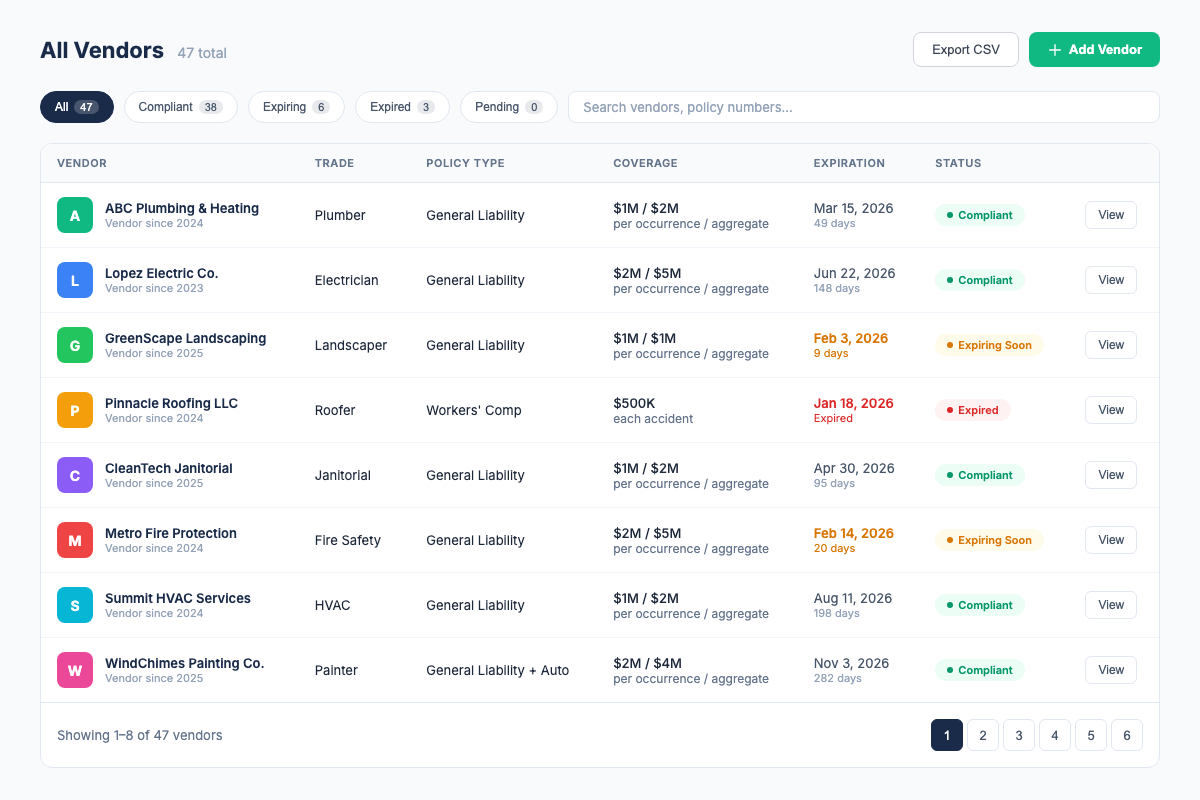
- Compliance dashboard. A single screen shows every vendor's status. Green means compliant. Yellow means expiring within 30 days. Red means expired or non-compliant. You know in 5 seconds whether you have a problem.
- Automatic expiration alerts. The software sends email alerts at 30, 14, and 7 days before a COI expires, to both you and the vendor. No one needs to remember to check dates. Expired certificates trigger immediate alerts.
- Vendor self-service portal. Instead of emailing COIs back and forth, vendors can upload their certificates directly into a secure portal. The software processes them automatically and alerts you when new COIs arrive or existing ones need attention.
- CSV roster export. Export current vendor and compliance-status data for owner, lender, or internal workflows; confirm any formal PDF-report requirement separately.
COI File is built specifically for property managers and contractors who are tired of chasing paper. It's a 7-day free trial on all plans, cancel anytime, and Base starts at $39/month for 10 vendors. Learn more about COI tracking →
Certificate of Insurance Requirements by Industry
COI requirements vary significantly by industry, property type, and the nature of the work being performed. Here's a brief overview:
Property Management
Property management COI requirements typically include general liability ($1M/$2M), workers' compensation (statutory), and auto liability ($1M) at minimum. Umbrella coverage ($5M+) is increasingly common for larger properties and higher-risk vendors. Learn more in our property manager's COI tracking guide.
Construction
Construction COI requirements are among the most stringent. General contractors typically require $2M/$4M general liability, statutory workers' comp, $1M auto, and $5M+ umbrella from all subcontractors. Additional insured, waiver of subrogation, and primary/non-contributory endorsements are standard. Read our contractor's COI tracking guide →
Facilities Management
Facilities management COI requirements vary by building type, office, retail, industrial, healthcare, but generally require GL, WC, and auto coverage. Healthcare facilities add professional liability and cyber liability requirements. Multi-building portfolios require centralized tracking. See our COI tracking guide for facilities-specific strategies.
Commercial Real Estate
CRE COI requirements cover both tenants (required by lease) and vendors (required by management). Tenant requirements include general liability, property insurance, and sometimes business interruption coverage. Vendor requirements mirror property management standards. Read our COI compliance guide for CRE professionals.
Frequently Asked Questions About Certificates of Insurance
Sources & Further Reading
- ACORD, Association for Cooperative Operations Research and Development. The nonprofit organization behind standard insurance forms (ACORD 25, 27, 28). acord.org
- NAIC, National Association of Insurance Commissioners. The U.S. standard-setting organization for state insurance regulators. Resources on certificate of insurance best practices and legislative updates. naic.org
- Insurance Services Office (ISO), Provider of standardized insurance policy forms and coverage language used across the industry. verisk.com/insurance
- International Risk Management Institute (IRMI), Authoritative resource for contractual risk transfer, additional insured endorsements, and COI compliance. irmi.com
- OSHA, Occupational Safety and Health Administration. Sets workplace safety standards that intersect with workers' compensation and insurance requirements. osha.gov
- State Insurance Departments, Each U.S. state maintains its own insurance department that regulates insurance requirements within that state. Check your state's specific requirements at naic.org/state-insurance-departments
Related Resources
- COI Tracking, Complete Guide, everything you need to know about tracking, verifying, and managing vendor certificates of insurance
- ACORD 25 Form, Complete Guide, line-by-line breakdown of the industry standard certificate of liability insurance
- COI Compliance, Best Practices, how to build a COI compliance program that actually works
- COI Documents Guide, understanding ACORD forms, endorsements, and certificate types
- Additional Insured, Complete Guide, why being a certificate holder is not enough
- How to Verify a COI, 12-point checklist to catch errors and fraud
- Certificate of Liability Insurance, what it covers, who needs one, minimum requirements
- COI Requirements by Industry, minimum insurance requirements for every trade and vendor type
- COI Requirements by State, California, Texas, Florida, New York, Illinois and all 50 states
- COI Tracking for Property Managers, industry-specific strategies for multi-property portfolios
- COI Tracking for General Contractors, per-project compliance tracking for construction
- myCOI Alternative, COI File vs. myCOI, compare features, pricing, and approach
Firdaosh Bano
COI Compliance Specialist
Firdaosh Bano is a COI compliance specialist and the founder of COI File. She spent 6 years managing vendor compliance for commercial properties - tracking 2,000+ COIs across 150+ properties in spreadsheets before building the tool she wished she'd had. She writes about certificate of insurance compliance, vendor risk management, and making insurance tracking less painful for small teams.