COI Tracking for Property Managers: The Complete Guide
Stop spending 10 hours a week chasing COIs. Learn how property managers automate vendor insurance compliance across their portfolio.
If you manage commercial, residential, or mixed-use properties, you already know the drill: a vendor shows up to fix an HVAC unit, you ask for their COI, they email a blurry PDF, you open it, squint at the ACORD 25 form, type the data into a spreadsheet, and repeat, 20 to 200 more times.
And that's just the upload part. Then there's verifying coverage limits, checking additional insured status, tracking expiration dates, and chasing vendors who let their insurance lapse. For most property managers, this takes 8-10 hours every week.
COI tracking software built for property managers changes the equation. This guide covers what property managers need to know about tracking certificates of insurance, the pain points, the solutions, and how to choose the right tool for your portfolio.
Why Property Managers Need COI Tracking Software
Property managers sit at the intersection of three forces that make manual COI tracking unsustainable:
- Volume. A single commercial property can have 20-50+ active vendors, HVAC techs, plumbers, electricians, landscapers, janitorial crews, elevator maintenance, fire suppression contractors, and more. Across a portfolio of 10 properties, you're tracking hundreds of certificates.
- Velocity. Certificates expire every year (sometimes every 6 months for certain trades). Each expiration means a follow-up email, a replacement PDF, a re-verification of coverage, and a spreadsheet update.
- Vulnerability. The stakes are high. If a vendor causes damage or injury while uninsured, the property owner, and potentially you, are on the hook. I've seen a single uncovered claim cost a property $47,000.
Manual tracking, spreadsheets, calendar reminders, and email chains, works for maybe 5-10 vendors. Beyond that, you're one missed expiration away from real liability.
The Pain Points of Manual COI Tracking
1. Spreadsheet Hell
You maintain a master spreadsheet with vendor names, policy types, coverage limits, effective dates, and expiration dates. Every new certificate requires 15-30 minutes of manual data entry. The spreadsheet gets passed around, duplicated, and eventually becomes a version-control nightmare where nobody knows which sheet is authoritative.
2. The Email Chase
Vendors don't proactively send updated certificates. You send an email. Wait a week. Send a follow-up. Wait. Send a third. Meanwhile, their insurance may have already lapsed. A vendor portal, where vendors upload their own certificates, eliminates this back-and-forth entirely.
3. No Visibility Into Compliance Status
You have 50 vendors across 5 properties. Which ones are compliant? Which expire next week? Which are missing the additional insured endorsement? Without a dashboard, answering these questions means scrolling through a spreadsheet row by row. By the time you find the gap, a vendor may already be working uninsured on your property.
4. Audit Anxiety
Property owners, corporate offices, and regulatory bodies periodically audit vendor insurance compliance. Without centralized records and automated reports, preparing for an audit means days of spreadsheet wrangling and email archaeology. A single missing certificate can flag a compliance failure.
5. Differing Requirements Per Property
One property requires $1M/$2M general liability plus additional insured. Another requires $2M/$4M plus umbrella. A third requires pollution liability for environmental contractors. Tracking different requirements per property in a spreadsheet is error-prone and nearly impossible at scale.
How COI Tracking Software Solves These Problems
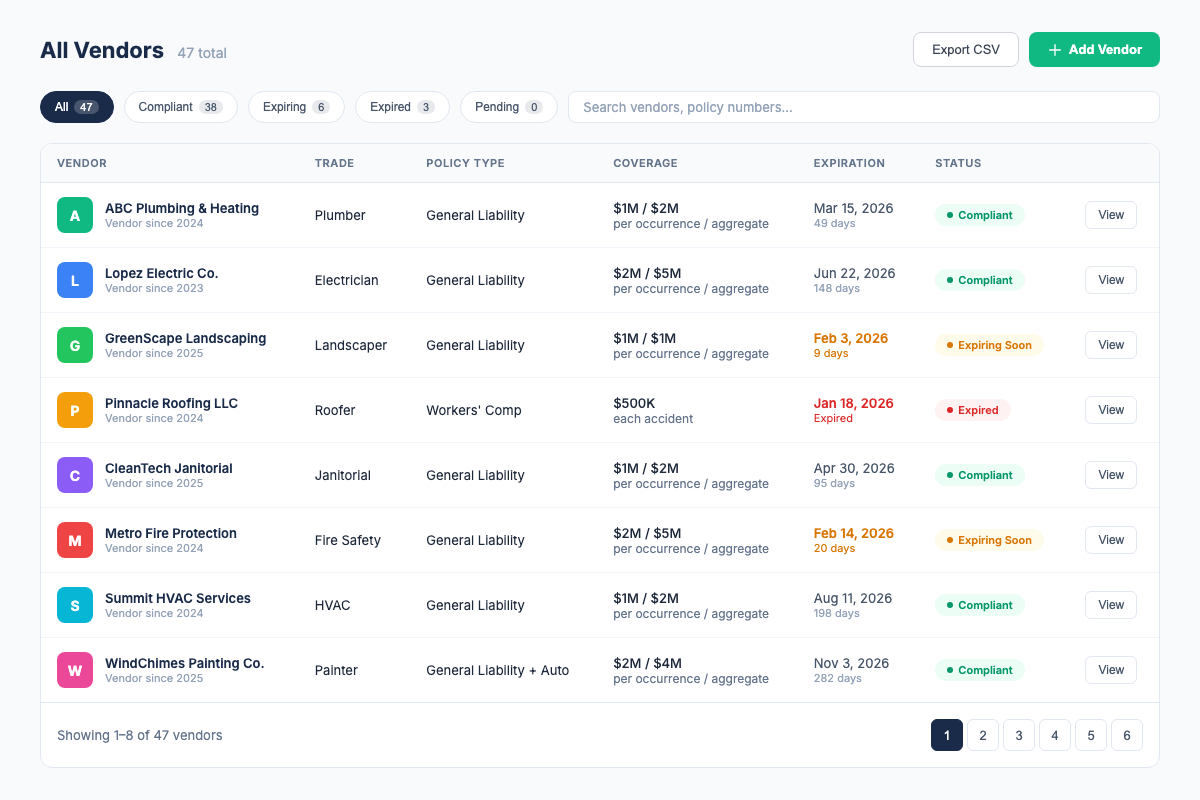
A COI tracking platform built for property managers replaces spreadsheets with three core capabilities:
1. AI-Assisted ACORD 25 PDF Review
Submit an ACORD 25 PDF and review surfaced policy types, coverage limits, effective dates, expiration dates, additional insured details, and endorsements before approval.
2. Compliance Dashboard
Every vendor's status is visible at a glance. Green = compliant. Yellow = expiring within 30 days. Red = expired or non-compliant. Use the roster and property context to focus follow-up, then export current status as CSV when needed.
3. Automatic Expiration Alerts
Email alerts go out at 30, 14, and 7 days before expiration, with broker CC/escalation support where configured. Review the replacement PDF before approving it.
COI File reduces repetitive certificate entry by surfacing details from ACORD 25 PDFs for review and keeping status and renewal dates in one roster.
What Property Managers Should Look For in COI Tracking Software
Not all COI tracking tools are built for property managers. Here's your checklist:
- Per-property organization. You should be able to group vendors by property and see compliance status per building. This is non-negotiable for portfolio management.
- Per-property requirement templates. Different properties have different insurance requirements. The software should let you define custom requirements per property and automatically flag non-compliant certificates.
- AI-assisted extraction. COI File currently supports an ACORD 25 PDF workflow that surfaces fields for human review.
- Vendor magic link. Give vendors a unique link to upload an updated PDF without creating an account.
- Automatic alerts. COI File sends alerts at 30, 14, and 7 days before expiration, with broker CC/escalation support where configured.
- CSV roster export. Export current vendor status for internal follow-up or sharing; verify any formal PDF-report requirement separately.
- Transparent pricing. If you have to "contact us for pricing," expect $500+/month. Look for pricing that's listed on the website and self-service signup.
- CSV import. You probably have an existing vendor spreadsheet. Import it in one click instead of starting from scratch.
COI Tracking Best Practices for Property Managers
- Define vendor insurance requirements in writing. Create a standard requirements document per property type. Specify minimum coverage limits, additional insured requirements, and any trade-specific needs (e.g., pollution liability for environmental contractors).
- Never let a vendor start work without a compliant COI on file. This is your single most important rule. If the COI isn't in the system showing green, the vendor doesn't start.
- Use a vendor portal. The fastest way to stop chasing certificates is to give vendors a way to upload them directly. Set the expectation at onboarding: "Here's your upload link. Submit your COI before your start date."
- Audit quarterly, not just at lease renewal. A vendor's insurance can lapse mid-term due to non-payment or cancellation. Run a compliance audit every quarter, not just when the lease comes up for renewal.
- Track the additional insured endorsement. A COI that doesn't list your organization as additional insured provides no protection. Make this a required field in your tracking system.
- Archive everything. Even expired certificates should be kept on file. You may need them for claims investigation or legal discovery.
- Automate before you scale. If you're adding properties, get your COI tracking system in place first. Manual tracking at 50 vendors is painful. At 200, it's impossible.
How COI File Helps Property Managers
COI File was built by a property management compliance specialist who spent 6 years tracking 2,000+ COIs across 150+ properties, in spreadsheets. Here's how it works for property managers:
- Review an ACORD 25 PDF. Submit a vendor PDF and review AI-assisted extracted policy types, coverage limits, dates, and additional insured details.
- Organize by property. Tag each vendor to a property. See compliance status per building on your dashboard.
- Set per-property requirements. Define the coverage limits, additional insured needs, and endorsements required for each property. COI File flags any certificate that doesn't match.
- Give vendors a magic link. Instead of chasing vendors by email, send them a unique upload link for their updated PDF.
- Get alerts, not surprises. Automatic email alerts at 30, 14, and 7 days before any certificate expires.
- Export the roster. Download current vendor and status data as CSV for internal follow-up or sharing.
COI File starts with a 7-day trial after secure checkout and payment-method setup. Base starts at $39/month for up to 10 vendors. Start a Base trial.
Frequently Asked Questions
Industry Sources
- Institute of Real Estate Management (IREM), Industry standards for property management operations and vendor compliance. irem.org
- National Association of Realtors (NAR), Resources on risk management for property managers and real estate professionals. nar.realtor
- International Risk Management Institute (IRMI), Expert guidance on contractual risk transfer and vendor insurance requirements. irmi.com
Related Resources
- COI Tracking: The Complete Guide, the full pillar page covering all aspects of COI tracking
- COI Tracking for General Contractors, how GCs manage subcontractor compliance on job sites
- Best COI Tracking Software, compare features, pricing, and which tool fits your needs
- COI File Features, see everything our platform does
- COI File Pricing, transparent pricing, 7-day free trial on all plans
Firdaosh Bano
COI Compliance Specialist
Firdaosh Bano is a COI compliance specialist and the founder of COI File. She spent 6 years managing vendor compliance for commercial properties - tracking 2,000+ COIs across 150+ properties in spreadsheets before building the tool she wished she'd had. She writes about certificate of insurance compliance, vendor risk management, and making insurance tracking less painful for small teams.