COI Tracking for Commercial Real Estate: Protect Your Portfolio
Stop juggling tenant and vendor COIs across your portfolio. Learn how CRE managers automate insurance compliance, enforce lease requirements, and prepare for audits in minutes.
Commercial real estate compliance is a two-front war. On one side, you have tenants, each with a lease that mandates specific insurance coverage limits, additional insured status, and often specialized endorsements. On the other side, you have vendors, HVAC contractors, janitorial crews, landscapers, elevator technicians, each carrying their own certificates that must be verified before they step onto the property.
Multiply that by a portfolio of 5, 15, or 50 properties, and you're tracking hundreds, sometimes thousands, of certificates of insurance. For most CRE managers, this means a constant stream of PDFs, spreadsheets, and email reminders that consume 10-15 hours every week.
COI tracking software built for commercial real estate consolidates both tenant and vendor compliance into a single dashboard. This guide covers what CRE managers need to know, the unique pain points, how software solves them, and what to look for when choosing a tool for your portfolio.
Why Commercial Real Estate Managers Need COI Tracking Software
CRE managers face a fundamentally different compliance challenge than other industries. You're not just tracking one type of certificate holder, you're managing two, each with different requirements, different stakeholders, and different consequences for non-compliance:
- Dual tracking burden. Property managers track vendors. CRE managers track both tenants and vendors, often hundreds of each across a portfolio. Tenant COIs must match lease requirements. Vendor COIs must match vendor-type requirements. Two systems, two sets of rules, one person responsible.
- Lease-specific requirements. Every lease is different. Suite 201 requires $1M/$2M general liability plus additional insured. Suite 302 requires $2M/$4M plus umbrella and pollution liability. Suite 108 requires builder's risk during buildout. Tracking these varying requirements manually is a recipe for missed gaps.
- Portfolio scale. A 10-property portfolio can mean 200+ tenants and 100+ active vendors. That's 300+ certificates, each expiring annually (or semi-annually), each requiring verification against specific requirements. At this scale, spreadsheets break.
- Audit pressure. Property owners, lenders, and insurance carriers audit COI compliance regularly. A single missing certificate can trigger a cascade of problems, loan covenant violations, coverage denial on a claim, or regulatory scrutiny. Preparing for audits manually takes weeks.
The Pain Points of Manual COI Tracking for CRE
1. Dual Tracking Burden
Tenants submit COIs to satisfy lease terms. Vendors submit COIs to satisfy vendor agreements. Two separate processes, two separate spreadsheets, two separate expiration calendars. When a tenant's insurance lapses and a vendor's certificate expires in the same week, something gets missed.
2. Lease-Specific Requirements
Each lease has unique insurance language, and it's your job to enforce it. A tenant might submit a perfectly valid COI that still fails to meet the lease because it's missing the additional insured endorsement or carries insufficient umbrella coverage. Without requirement templates, you're manually cross-referencing each COI against each lease. At 100+ tenants, this is not sustainable.
3. Tenant Insurance Lapses
Tenants let their insurance lapse for many reasons, they switch carriers, miss a payment, or forget to renew. When a tenant's policy lapses, the property owner assumes that liability. In most leases, a lapse constitutes a default. But if you don't catch it until weeks later, the damage is already done, and the liability window is open.
4. Scale Problems
A single commercial building with 30 tenants generates 30 certificates per year, plus renewals, plus mid-term changes when tenants switch carriers. Across 20 buildings, you're tracking 600+ certificates. A spreadsheet has no alerts, no dashboards, no automated verification. You're one missed row away from a $100,000 uncovered claim.
5. Audit Anxiety
When an owner, lender, or insurance carrier requests a compliance audit, manual preparation means days of pulling certificates, cross-referencing against leases, and building reports. A single missing certificate can derail a refinancing or trigger a carrier investigation. With COI tracking software, audits take minutes, not weeks.
How COI Tracking Software Solves CRE Compliance
A purpose-built COI tracking platform addresses each of these pain points with dedicated CRE features:
1. Vendor Roster by Property
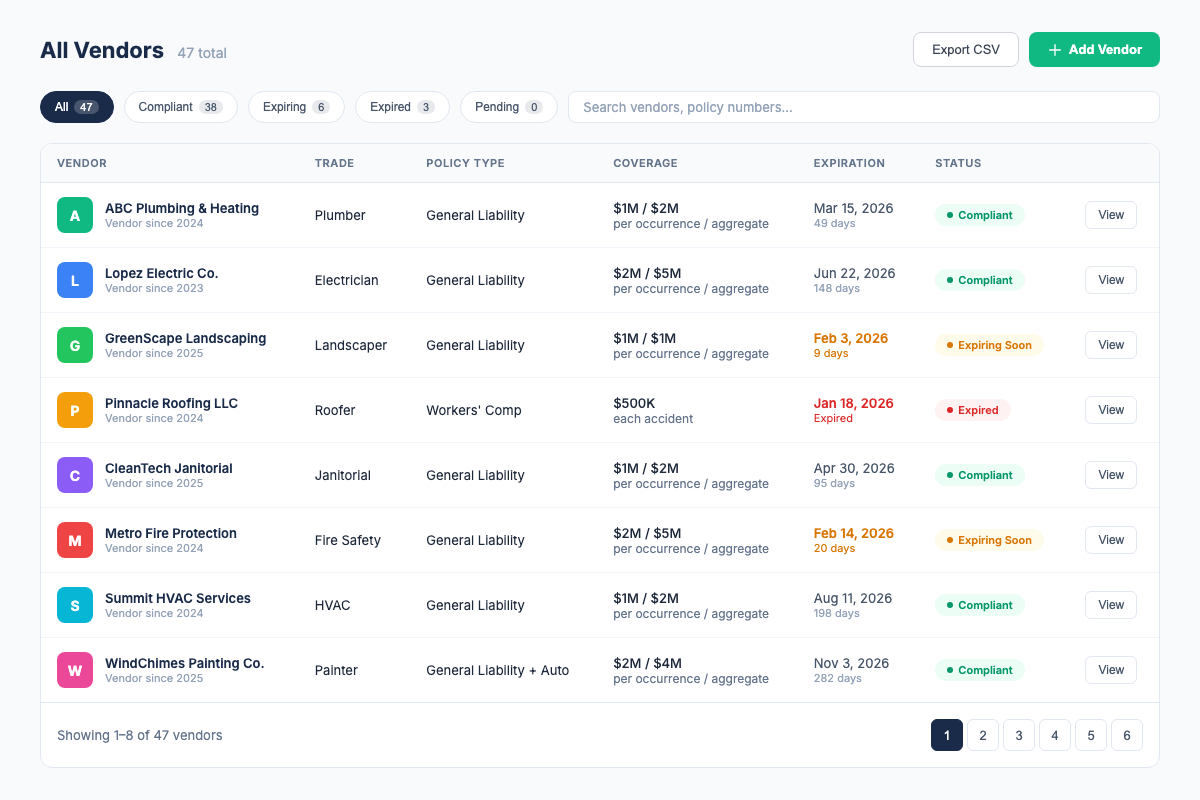
Vendor records live in a dashboard organized around properties. See compliant, expiring, expired, and deficient statuses in one view. Tenant records are not a separate current workflow.
2. Property-Specific Certificate Checks
Configure the certificate-holder and additional-insured wording that applies to a property, then review surfaced certificate fields and gaps before approving a vendor record.
3. Vendor Renewal Alerts
COI File sends email alerts at 30, 14, and 7 days before a vendor certificate expires, with broker CC/escalation support where configured.
4. CSV Roster Export
Export current vendor and status data as CSV for internal follow-up or sharing. Formal PDF reporting is not part of the current product workflow.
5. ACORD 25 PDF Review
Submit an ACORD 25 PDF, review AI-assisted extracted details, and use the roster status to guide the next follow-up.
What CRE Managers Should Look For in COI Tracking Software
Not every COI tracker handles the CRE use case. Here's your checklist:
- Tenant + vendor scope. If you need both entity types, verify that the product supports both; COI File is currently vendor-focused.
- Property requirement checks. Verify how the product handles custom certificate-holder, additional-insured, coverage-limit, and endorsement requirements.
- AI-assisted extraction. COI File currently supports an ACORD 25 PDF workflow that surfaces key fields for human review.
- Automatic alerts. COI File sends vendor renewal alerts at 30, 14, and 7 days before expiration.
- Roster export. COI File supports CSV export for sharing current vendor status; verify any PDF-report requirement separately.
- Transparent pricing. CRE portfolios generate enough overhead. If you have to call a sales rep for pricing, expect enterprise rates. Look for pricing that's listed publicly and starts at a reasonable tier.
- CSV import. COI File supports bringing an existing vendor list into the workflow on supported plans.
COI Tracking Best Practices for CRE Managers
- Standardize lease insurance language. Work with legal to create a standard insurance requirements addendum that you can attach to every lease. This makes requirement templates consistent across your portfolio and reduces the number of exceptions you need to track.
- Collect COIs before lease execution. Don't hand over keys until you have a compliant certificate on file. This is the single most effective way to prevent coverage gaps, and it sets the expectation that compliance is not optional.
- Track tenant and vendor COIs in one system. If you're using separate spreadsheets for tenants and vendors, you're doubling your administrative load and creating blind spots. A unified dashboard gives you total portfolio visibility.
- Audit quarterly, not annually. Tenants and vendors can let insurance lapse mid-term due to non-payment, carrier changes, or cancellations. Run a full portfolio compliance audit every quarter to catch lapses before they become liabilities.
- Require 30-day cancellation notice from insurers. Most commercial policies include a provision requiring the insurer to notify the certificate holder if the policy is canceled. Make sure this is a lease and vendor agreement requirement, and verify it on every COI.
- Verify additional insured status on every certificate. A COI that doesn't name your entity as additional insured provides no protection. This is the most common compliance gap in CRE, and the most dangerous.
- Archive everything. Maintain a complete digital record of every certificate, including expired ones. You'll need them for claims investigation, legal discovery, and proving compliance history to owners and lenders.
How COI File Helps CRE Managers
COI File was built by a property management compliance specialist who spent 6 years tracking 2,000+ COIs across 150+ properties. Here's how it works for commercial real estate:
- Review an ACORD 25 PDF. Submit a vendor PDF and review AI-assisted extracted policy types, limits, dates, additional insured details, and endorsements.
- Track vendors by property. Assign vendor records to properties and see their current compliance status in one roster.
- Check property wording. Use property-specific holder and endorsement requirements to guide review.
- Get renewal alerts. Automatic email alerts at 30, 14, and 7 days before a vendor certificate expires.
- Export the roster. Download current vendor status data as CSV for internal follow-up or sharing.
COI File starts with a 7-day trial after secure checkout and payment-method setup. Base starts at $39/month for up to 10 vendors. Start a Base trial.
Frequently Asked Questions
Industry Sources
- Building Owners and Managers Association (BOMA), Standards and resources for commercial real estate operations, risk management, and tenant compliance. boma.org
- National Association of Realtors (NAR), Commercial real estate risk management and insurance guidance. nar.realtor/commercial
- CRE Finance Council, Industry standards for commercial real estate lending and insurance compliance requirements. crefc.org
Related Resources
- COI Tracking: The Complete Guide, the full pillar page covering all aspects of COI tracking
- COI Tracking for Property Managers, how PMs manage vendor compliance across multiple properties
- COI Tracking for General Contractors, how GCs manage subcontractor compliance on job sites
- Best COI Tracking Software, compare features, pricing, and which tool fits your needs
- COI File Features, see everything our platform does
- COI File Pricing, transparent pricing, 7-day free trial on all plans
Firdaosh Bano
COI Compliance Specialist
Firdaosh Bano is a COI compliance specialist and the founder of COI File. She spent 6 years managing vendor compliance for commercial properties - tracking 2,000+ COIs across 150+ properties in spreadsheets before building the tool she wished she'd had. She writes about certificate of insurance compliance, vendor risk management, and making insurance tracking less painful for small teams.