COI Tracking for General Contractors: Subcontractor Insurance Compliance
GCs manage the most complex COI tracking scenarios -- 10 to 50+ subcontractors per project, each with different insurance requirements. Learn how to build a compliance system that scales.
General contractors sit at the center of the most complex COI tracking challenge in the construction industry. On a single commercial project, a GC may contract with 30 different subcontractors -- each of whom may further subcontract to another 20 specialists. That is potentially 600 entities whose certificates of insurance must be collected, verified, tracked, and kept current -- and the GC is ultimately responsible for every single one.
What makes the GC\'s position uniquely demanding is not just the volume. It is the fact that every subcontractor has different insurance requirements based on their trade, their scope of work, and the risk tier they occupy. An electrician wiring a control panel needs different coverage than a roofer installing a membrane. A structural steel erector needs different additional insured endorsements than a finish carpenter. A single COI tracking mistake -- accepting a roofer\'s certificate that only shows $1M/$2M GL instead of the required $2M/$4M -- can expose the GC to a million dollars or more in uncovered liability on a single claim.
This guide is written for GCs who need to build a subcontractor COI compliance system that scales -- one that handles 50 subs as easily as five, enforces trade-specific coverage requirements automatically, and produces audit-ready compliance reports on demand.
Why GCs Face the Most Complex COI Tracking Challenge
The GC\'s COI tracking burden is fundamentally different from that of a property manager or a single-trade subcontractor. Several structural factors create a compliance challenge that cannot be solved with spreadsheets and email reminders:
- Volume at scale. A property manager might track 50 vendors across 10 properties. A GC tracks 50 subcontractors on a single project -- and may have 5-10 active projects running simultaneously. That is 250-500 active certificates at any given time, each with different expiration dates, different coverage requirements, and different renewal cadences. At this volume, a single expired certificate represents a statistical near-certainty if tracking is manual.
- Trade-specific requirements. Different trades require different coverages. Electricians need completed operations and auto liability. HVAC contractors need professional liability. Roofers need $2M/$4M GL and $5M umbrella. Painters need only $1M/$2M GL. A GC cannot apply a single standard to all subcontractors -- each trade requires its own requirement template, and each certificate must be verified against the correct one.
- Sub-tier liability. The GC\'s subcontract includes insurance requirements for the primary sub. But each primary sub may hire sub-subs, and those sub-subs may hire sub-sub-subs. Under most construction contracts, the GC is ultimately responsible for ensuring that every entity performing work on the project carries adequate insurance. If a third-tier sub-sub without workers\' comp is injured on site, the GC is the target of the claim -- even if the GC never knew that sub-sub existed.
- Contract compliance and surety requirements. The GC\'s own insurance program, surety bonds, and owner contracts all require that every subcontractor maintain specified insurance coverage and name the GC and owner as additional insureds. Subcontractor compliance is not just good practice -- it is a contractual obligation whose breach can trigger coverage denial, bond default, or contract termination.
The Pain Points of Manual COI Tracking for General Contractors
1. Scale Breakdown
Manual COI tracking works passably at five subcontractors. At 15, it becomes a part-time job. At 30, it becomes a full-time job that still produces errors. At 50+, it breaks entirely. The math is straightforward: if verifying one certificate takes 10 minutes (open email, download PDF, check coverage limits, compare against requirements, log in spreadsheet, file certificate, send follow-up if non-compliant), verifying 300 certificates takes 50 hours -- more than a full work week -- every single time a project ramps up or renewal season hits. GCs running multiple projects simply cannot sustain this without software.
2. Trade-Specific Requirement Matching
A roofing subcontractor submits a COI showing $1M/$2M GL -- compliant for a painter, but insufficient for a roofer. A manual reviewer who applies a blanket standard will approve this certificate. A reviewer who knows roofing requirements will catch it -- but only if they remember to check the right requirement set for each trade. Across 30 trades, each with its own requirements, the error rate on manual matching is unacceptably high.
3. Additional Insured Endorsement Tracking
Every subcontractor\'s COI must name the GC, the owner, and often the lender or architect as additional insureds -- and must include the correct endorsement forms (CG 20 10 for ongoing operations, CG 20 37 for completed operations). But the exact entities to be named vary by project: Project A requires the GC, Owner LLC, and First National Bank as additional insureds. Project B requires the GC, a different Owner LLC, and a different lender. Tracking these per-project additional insured requirements across 50 subcontractors and five projects is a matrix of 250+ data points that spreadsheets cannot reliably manage.
4. Expiration Calendar Overload
Subcontractors purchase insurance on different cycles. Some renew in January, others in June, others in October. Across 50 subs, policy expirations are scattered across all 12 months -- and each expiration requires a follow-up sequence (request new certificate, verify it, update records, escalate if not received). Manual expiration tracking means maintaining a constantly shifting calendar of dozens of deadlines, any one of which can be missed during a busy week on site.
5. Audit Preparation and Owner Reporting
Owners, lenders, and surety carriers periodically audit the GC\'s subcontractor compliance. Manual audit preparation means pulling every certificate, cross-referencing against every subcontract, identifying gaps, and building a report -- a process that can take two to three weeks of dedicated staff time. Each audit cycle is a disruption to project management, and a single missing certificate can delay draws, trigger loan covenant violations, or cause the owner to lose confidence in the GC\'s project controls.
How COI Tracking Software Scales GC Compliance
A purpose-built COI tracking platform designed for the GC use case addresses each of these scale-derived pain points:
1. ACORD 25 PDF Review
Submit an ACORD 25 PDF for a subcontractor and review AI-assisted surfaced policy types, coverage limits, dates, additional insured details, and endorsements before approval.
2. Project Context
Use property and project tagging to keep subcontractor records in context. Review the certificate against the coverage, holder, and endorsement requirements that apply to the job before approving it.
3. Property-Specific Holder and Endorsement Checks
Configure the holder and endorsement wording that applies to the property or project, then use the review workflow to identify gaps before a subcontractor record is approved.
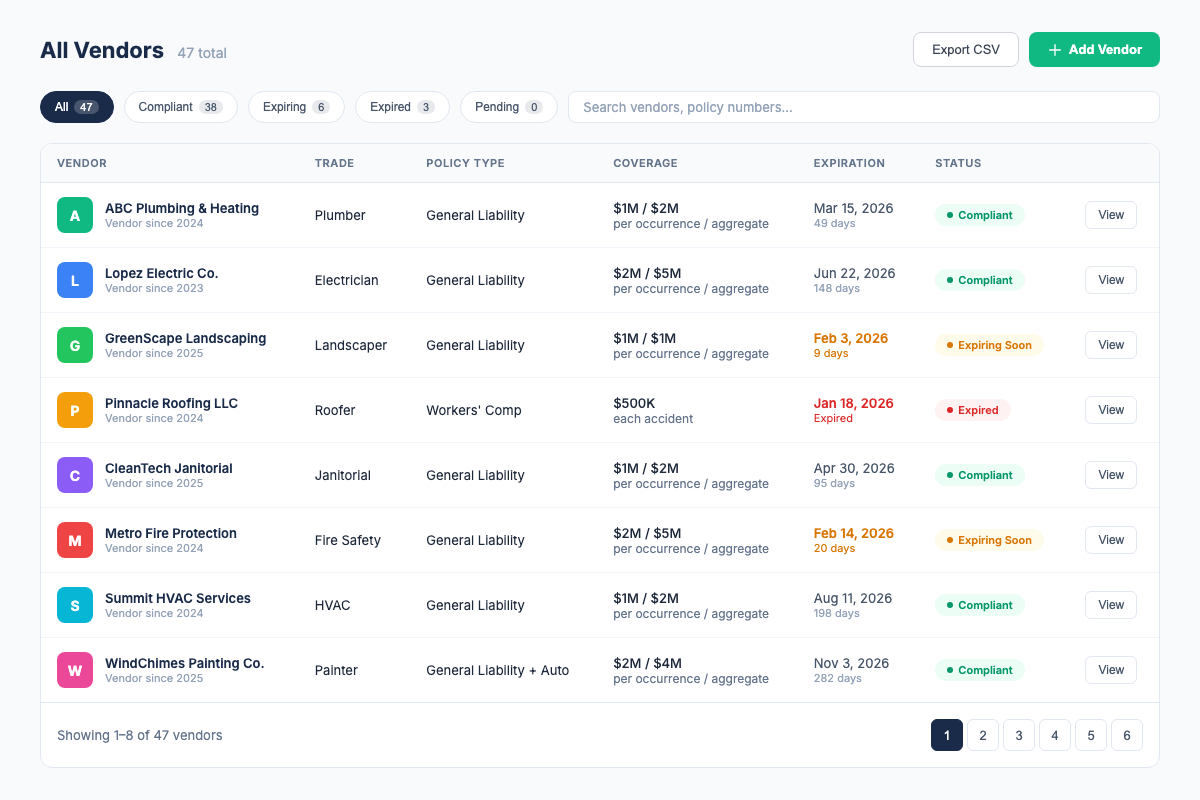
4. Centralized Expiration Tracking and Automated Alerts
Vendor records across projects are tracked in a single dashboard. Automatic renewal alerts go out at 30, 14, and 7 days before expiration, so the GC can focus on the records that need attention.
5. CSV Roster Export
Export current subcontractor and compliance-status data as CSV for internal follow-up or sharing. Confirm any formal owner, lender, or PDF-report requirement separately.
What to Look for in GC COI Tracking Software
- Trade-specific requirement templates. The platform must support different coverage requirements for different trades -- not a single subcontractor standard. If it cannot differentiate between an electrician and a roofer, it is not built for GCs.
- Per-project additional insured tracking. Each project has different entities that must be named as additional insureds. The software must verify that each subcontractor\'s certificate lists the correct entities for the specific project.
- AI-assisted PDF review. COI File currently supports an ACORD 25 PDF workflow that surfaces key fields for human review.
- Sub-tier visibility. The platform should allow GCs to require certificates from second-tier and third-tier subs, either through the primary subcontractor or directly. If it only tracks prime subcontractors, it leaves dangerous blind spots.
- Multi-project dashboard. A GC with five active projects needs a single view that shows compliance status across all projects, with the ability to drill down into any project, any trade, or any individual subcontractor.
- Automatic expiration alerts with escalation. 30/14/7-day alerts to both GC and subcontractor. If the renewal certificate is not received by day 0, the alert escalates and the subcontractor\'s status is flagged as non-compliant.
- Roster export. COI File supports CSV export for current vendor status; verify any formal PDF-report requirement separately.
- Integration with project management tools. The GC already uses Procore, Buildertrend, or similar PM software. The COI tracking platform should either integrate with these tools or provide an API for syncing subcontractor lists and compliance status.
COI Tracking Best Practices for General Contractors
- Build a trade-specific requirement library. Before your next project, define insurance requirements for every trade you regularly contract with. Create at least two tiers per trade (standard and high-risk) and codify them in your COI tracking platform. Consistent requirement templates eliminate the "which trade needs what" guesswork.
- Collect COIs before subcontract execution -- not after. Make a compliant certificate a precondition of signing the subcontract. This single policy change eliminates the most common compliance gap: subcontractors who start work before their COI is verified.
- Track per-project additional insured entities. Every project has different owners, lenders, and stakeholders that must be named as additional insureds. Maintain a per-project additional insured list and verify it on every subcontractor certificate specific to that project.
- Require sub-tier COI visibility. Include a clause in every subcontract requiring the prime sub to provide COIs for all sub-subs -- and that the prime sub must update you when sub-subs change during the project. Enforce this through your COI tracking platform.
- Run monthly compliance reviews. Do not wait for the owner audit to discover compliance gaps. Run a full compliance report on every active project at the end of each month. Address non-compliant or expiring certificates immediately -- do not let them slide to the next month.
- Train project managers on COI requirements. PMs are the first line of defense. They know which subs are on site and which new subs are about to start. Train every PM to check the compliance dashboard before allowing a new subcontractor to mobilize, and to report any sub on site that does not appear as compliant.
- Maintain complete audit archives. Construction defect claims can be filed years after project completion. Your COI tracking system must retain complete, searchable records of every subcontractor certificate, verification result, and status change for the full statute of repose period in your state -- typically 6-10 years.
How COI File Helps General Contractors Manage Subcontractor Compliance
COI File was built for the scale and complexity of GC subcontractor compliance. Here\'s how it works:
- Review an ACORD 25 PDF. Submit a subcontractor PDF and review AI-assisted extracted policy types, limits, dates, additional insured details, and endorsements.
- Tag the project. Organize subcontractor records by property or project so the roster stays useful across jobs.
- Check requirements. Use property-specific holder and endorsement wording to guide the review.
- Use a magic link. Send a subcontractor a secure upload link for an updated PDF without requiring an account.
- See status and renewal work. Use the dashboard and 30/14/7-day alerts to identify records that need attention.
- Export the roster. Download current subcontractor status as CSV for internal follow-up or sharing.
COI File starts with a 7-day trial after secure checkout and payment-method setup. Base starts at $39/month for up to 10 vendors. Start a Base trial.
Frequently Asked Questions
Industry Sources
- Associated General Contractors of America (AGC) -- Industry standards, risk management programs, and subcontractor compliance resources for general contractors. agc.org
- Construction Financial Management Association (CFMA) -- Financial and risk management best practices for construction companies, including subcontractor insurance compliance. cfma.org
- American Institute of Architects (AIA) Contract Documents -- Standard construction contract forms including A201 General Conditions, which define subcontractor insurance requirements. aiacontracts.org
Related Resources
- COI Tracking: The Complete Guide -- the full pillar page covering all aspects of COI tracking
- COI Tracking for Electricians -- insurance requirements for electrical contractors
- COI Tracking for Plumbers -- completed operations and water damage coverage for plumbing contractors
- COI Tracking for HVAC Contractors -- multi-coverage requirements for HVAC compliance
- COI Tracking for Roofers -- high-risk Tier 3 coverage requirements for roofing contractors
- COI Tracking for Commercial Real Estate -- tenant and vendor compliance across property portfolios
Firdaosh Bano
COI Compliance Specialist
Firdaosh Bano is a COI compliance specialist and the founder of COI File. She spent 6 years managing vendor compliance for commercial properties - tracking 2,000+ COIs across 150+ properties in spreadsheets before building the tool she wished she'd had. She writes about certificate of insurance compliance, vendor risk management, and making insurance tracking less painful for small teams.