COI Compliance Rate: How to Measure and Improve Vendor Insurance Compliance
Most organizations have no idea what their compliance rate is -- and the ones that do are often below 50%. Learn how to measure, benchmark, and improve your vendor insurance compliance rate.
Ask any property manager or risk officer what their vendor insurance compliance rate is, and you will get one of two answers. The first is a confident number -- "around 80%" -- that has never been measured. The second is uncomfortable silence. Neither is good.
When organizations actually measure their compliance rate for the first time, the results are sobering. The average manual compliance rate across industries sits in the low 40% range. That means fewer than half of your vendors have current, compliant certificates of insurance on file. The other 60% are working on your property, on your job site, or under your contracts without verified insurance coverage -- and you are liable for whatever happens.
This guide covers what a compliance rate actually means, how to calculate it correctly, the industry benchmarks you should aim for, the factors that drag your rate down, and a step-by-step plan to take your compliance rate from where it is today to 90% or higher.
What Is a COI Compliance Rate and How to Calculate It
A COI compliance rate is the percentage of your vendors or tenants who have current, verified certificates of insurance on file that meet all of your documented insurance requirements. The formula is simple, but getting the inputs right is where most organizations stumble.
The Compliance Rate Formula
Compliance Rate = (Number of Compliant Vendors / Total Number of Active Vendors) x 100
But each term in this formula requires careful definition:
- Compliant Vendor: A vendor whose certificate of insurance is (a) not expired, (b) includes all required coverage types at or above minimum limits, and (c) names your organization as additional insured where required. All three conditions must be met. A certificate that is current but has insufficient limits is non-compliant.
- Active Vendor: Any vendor currently performing work for your organization, under contract, or otherwise engaged in operations on your property or job site. Include vendors whose certificates have lapsed -- they are still active and still a risk. Excluding lapsed vendors from your denominator artificially inflates your compliance rate and hides real liability exposure.
Worked Example
Your organization has 150 active vendors. After auditing, you find:
- 62 vendors have current certificates that meet all requirements (fully compliant)
- 38 vendors have current certificates but are missing additional insured status or have insufficient limits (partially compliant -- counted as non-compliant)
- 28 vendors have expired certificates (non-compliant)
- 22 vendors have no certificate on file at all (non-compliant)
Your compliance rate: 62 / 150 = 41.3%
This is a typical result for an organization tracking COIs manually. The 88 non-compliant vendors represent real, current liability exposure -- and most organizations do not know which 88 they are until they measure.
Industry Benchmarks for Vendor Insurance Compliance
Context matters. A 60% compliance rate in one industry may be excellent, while in another it is dangerously low. Here is what the data shows across sectors:
Manual Tracking Benchmarks (Spreadsheets, Email, Paper Files)
- Commercial Real Estate: 35-45% -- driven by high vendor counts, lease-specific requirement variation, and tenant insurance lapses
- Construction / General Contracting: 40-50% -- subcontractor turnover, per-project requirements, and certificate churn depress rates
- Property Management: 38-48% -- moderate vendor counts but high policy type variation (GL, workers' comp, auto, umbrella)
- Healthcare Facilities: 42-52% -- stricter internal policies help, but high vendor volume offsets gains
- Manufacturing: 45-55% -- generally fewer vendors, but specialized coverage requirements (pollution, product liability) create gaps
The takeaway: manual compliance rates across industries cluster in the low-to-mid 40s. This is not a failure of any one organization's process -- it is the natural ceiling of what spreadsheets and manual tracking can achieve at scale.
Automated Tracking Benchmarks (COI Tracking Software)
Organizations that switch from manual tracking to COI tracking software consistently report dramatic improvements. Industry data from providers including SmartCompliance and Vertikal RMS shows:
- SmartCompliance client data: Clients moving from manual tracking to their platform report compliance rate improvements from an average of 42% to 94% within 6 months of implementation. The combination of automated expiration alerts and requirement matching eliminates the two biggest causes of non-compliance: missed expirations and insufficient coverage limits.
- Vertikal RMS client data: Organizations using their risk management platform achieve average compliance rates of 91% across portfolios, with the top quartile exceeding 97%. Key drivers include automated vendor follow-up sequences and real-time compliance dashboards that make non-compliance immediately visible to all stakeholders.
- COI File: COI File does not publish a benchmark or guarantee a target rate. Import your existing roster, define the requirements that matter for your properties or projects, and use the live statuses and renewal reminders to establish a measurable baseline.
Software does not make vendors more responsive. It makes you more consistent -- and consistency is what drives compliance rates up.
What Hurts Your Compliance Rate
Improvement starts with diagnosis. These are the five factors that depress compliance rates across every industry, ranked by impact:
1. Missed Expirations (Impact: High)
This is the number one driver of low compliance rates. Certificates expire every day. Without automated alerts, expiration dates are buried in spreadsheets until someone remembers to check -- and someone remembers less often than anyone wants to admit. A vendor with an expired certificate is non-compliant the moment the expiration date passes. If it takes you 45 days to notice, that vendor has been a liability gap for 45 days.
2. Insufficient Coverage Limits (Impact: High)
A vendor submits a certificate showing $500,000 in general liability coverage. Your requirement is $1,000,000. The certificate is current. It is on file. It looks compliant at a glance. But it fails the requirement -- and manual review catches this only if someone cross-references the certificate against the requirement checklist. For organizations tracking 100+ vendors, this cross-referencing happens inconsistently, and insufficient limits become invisible compliance gaps.
3. Missing Additional Insured Endorsements (Impact: High)
This is the single most common specific compliance gap. A vendor's certificate lists your organization as the certificate holder but not as additional insured. As certificate holder, you receive notice if the policy is canceled. As additional insured, you receive direct coverage under the vendor's policy. The difference is enormous -- and it is regularly missed because the additional insured box on an ACORD 25 form is small, often handwritten, and easy to overlook during manual review.
4. Vendor Non-Responsiveness (Impact: Medium-High)
Some vendors simply do not respond to certificate requests. They ignore emails, avoid calls, and hope the requirement goes away. Without an escalation process and real consequences (suspension of work authorization, contract penalties), these vendors become permanent compliance gaps that drag your rate down month after month.
5. Data Decay Between Audits (Impact: Medium)
Organizations that audit compliance quarterly or annually experience data decay between audits. A vendor's certificate expires in month 2. The quarterly audit happens in month 3. For 30 days, that vendor was non-compliant and nobody knew. If you measure compliance only at audit time, your snapshot looks better than your day-to-day reality. Continuous monitoring closes this gap, and it is the single biggest advantage of software over periodic manual audits.
How to Measure Your Compliance Rate
Measuring your compliance rate correctly is the foundation of improvement. A miscalculated rate -- whether inflated or understated -- leads to misallocated resources and missed risks. Here is the correct method:
Step 1: Define Your Active Vendor Universe
Pull a complete list of every vendor currently performing work, under contract, or otherwise engaged with your organization. Include vendors with expired certificates. Include vendors with no certificate on file. Every vendor in scope for your insurance compliance program belongs in the denominator. If you exclude vendors because "they never respond" or "we are working on it," your compliance rate becomes a vanity metric that hides real exposure.
Step 2: Define Your Compliance Criteria
Document exactly what constitutes a compliant certificate. This must include:
- Minimum coverage types required (general liability, workers' comp, auto, umbrella, etc.)
- Minimum coverage limits for each type
- Additional insured requirement (yes/no, and which entity must be named)
- Any required endorsements (waiver of subrogation, primary and non-contributory, etc.)
- Certificate currency (expiration date must be in the future)
Write this down. If your criteria live in someone's head, they are inconsistent by definition, and your compliance rate cannot be trusted.
Step 3: Audit Every Active Vendor
For each active vendor, locate the most recent certificate on file. Check it against all five criteria above. If any criterion is not met, the vendor is non-compliant. No partial credit. This audit will take 2-3 minutes per vendor if done manually -- for 150 vendors, that is a 5-7.5 hour exercise. Schedule it as a dedicated project, not something to squeeze in between other tasks.
Step 4: Calculate and Document
Apply the formula: Compliant Vendors / Total Active Vendors x 100. Document the date of measurement, the criteria used, and the breakdown of non-compliance reasons (expired, insufficient limits, missing additional insured, missing certificate). This breakdown tells you where to focus improvement efforts.
Step 5: Set a Measurement Cadence
Recalculate monthly. If the monthly process is too time-consuming to sustain, that is itself a signal that you have outgrown manual measurement and should adopt software with a live compliance dashboard. A compliance rate measured once per year is a historical artifact, not a management tool.
How to Improve Your Compliance Rate from 40% to 90%+
Moving from a 40% compliance rate to 90%+ is a process, not an event. It takes most organizations 6-12 months. But the path is well-established, and every organization that has walked it reports the same sequence of steps:
Phase 1: Stop the Bleeding (Months 1-2)
Focus exclusively on expired certificates and missing certificates -- the vendors who are currently generating the most liability exposure. This is triage, not optimization. Send renewal requests to every vendor with an expired certificate. Send initial requests to every vendor with no certificate on file. Set a 30-day deadline with explicit consequences for non-response. Target: move from 40% to 60% compliance by closing the most urgent gaps.
Phase 2: Fix the Requirements Gap (Months 2-4)
Now address the vendors who have current certificates but insufficient limits or missing additional insured endorsements. Send each vendor a specific, documented list of what is wrong and what is required. Attach your insurance requirements document. Set a 30-day deadline for updated certificates. Target: move from 60% to 75% by resolving requirement-specific non-compliance.
Phase 3: Automate Renewal Management (Months 3-6)
This is where compliance rate improvement becomes self-sustaining. Deploy COI tracking software with automated expiration alerts. Every vendor whose certificate is expiring in the next 30 days gets an automatic email. Every vendor whose certificate has insufficient limits gets flagged automatically. The manual follow-up burden drops by 70-80%, and your compliance team can focus on the 10-20% of vendors who genuinely need personal attention. Target: move from 75% to 85%+ by eliminating the missed-expiration problem.
Phase 4: Build a Compliance Culture (Months 6-12)
The final 5-10% of compliance rate improvement comes from changing vendor behavior, not just your internal processes. This requires: (1) consistent enforcement -- vendors who repeatedly fail to provide certificates lose work authorization, (2) contract language that makes insurance compliance a condition of payment, not just a checkbox, and (3) vendor education -- many small vendors genuinely do not understand what additional insured means or why it matters. A 5-minute conversation with a vendor explaining the requirement is often more effective than 5 reminder emails. Target: 90%+ sustained compliance rate.
Key Metric to Track During Improvement
Do not just track the overall compliance rate. Track these leading indicators that predict improvement:
- Time-to-renewal: Average days between an expiration alert being sent and a renewed certificate being received. Target: under 21 days.
- First-response rate: Percentage of vendors who respond to the first renewal request (no follow-up needed). Target: above 60%.
- Requirement gap rate: Percentage of submitted certificates that fail requirement matching on first submission. Target: under 15%.
- Non-responsive vendor count: Vendors who have not responded after three follow-ups. Target: under 5% of total vendor base.
How COI File Drives Higher Compliance Rates
COI File helps make the drivers of non-compliance visible and gives you a repeatable renewal workflow. It does not replace your requirements review or guarantee a particular compliance rate:
- Renewal alerts. COI File sends email alerts at 30, 14, and 7 days before a certificate expires, helping you request an updated PDF before coverage lapses.
- AI-assisted extraction. Upload an ACORD 25 PDF and review surfaced policy types, coverage limits, effective dates, expiration dates, additional insured details, and endorsements before approval.
- Requirement checks. Configure property or project requirements and use the review workflow to identify missing or insufficient coverage details.
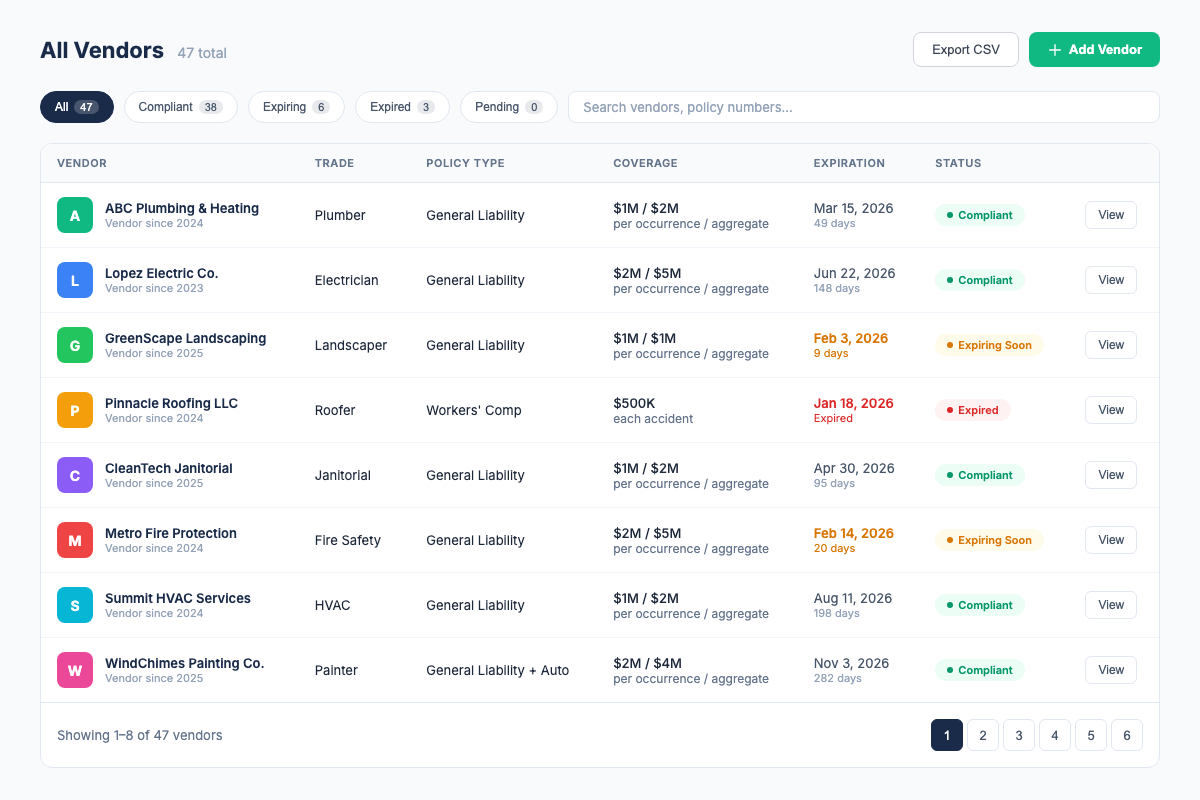
- Vendor roster. See compliant, expiring, expired, and deficient vendors together, with filters and actions for the next follow-up.
- CSV import and export. Start from an existing vendor list and export the roster for internal follow-up or sharing.
COI File starts with a 7-day trial after secure checkout and payment-method setup. Base starts at $39/month for 10 vendors. Start a Base trial.
Frequently Asked Questions
Industry Sources
- IRMI (International Risk Management Institute) -- Risk management standards, certificate of insurance compliance frameworks, and industry benchmarks. irmi.com
- SmartCompliance (Mitratech) -- Published client data on compliance rate improvements from automated COI tracking; average improvement from 42% to 94% within 6 months. mitratech.com/solutions/smartcompliance
- Vertikal RMS -- Risk management platform reporting average client compliance rates of 91% with top-quartile clients exceeding 97%. vertikalrms.com
Related Resources
- COI Tracking: The Complete Guide -- the full pillar page covering all aspects of COI tracking
- Spreadsheet COI Tracking Guide -- Excel and Google Sheets setup, hidden costs, and when to switch
- Best COI Tracking Software -- compare features, pricing, and which tool fits your needs
- COI Tracking for Commercial Real Estate -- CRE-specific compliance tracking for tenants and vendors
- COI File Features -- see everything our platform does
- COI File Pricing -- transparent pricing, 7-day free trial on all plans
Firdaosh Bano
COI Compliance Specialist
Firdaosh Bano is a COI compliance specialist and the founder of COI File. She spent 6 years managing vendor compliance for commercial properties - tracking 2,000+ COIs across 150+ properties in spreadsheets before building the tool she wished she'd had. She writes about certificate of insurance compliance, vendor risk management, and making insurance tracking less painful for small teams.